Connectors, agents, and third-party workflows: designing a SaaS integration portfolio
How to design a SaaS integration portfolio across native connectors, marketplace apps, iPaaS, and MCP servers, and which surface wins for each customer.
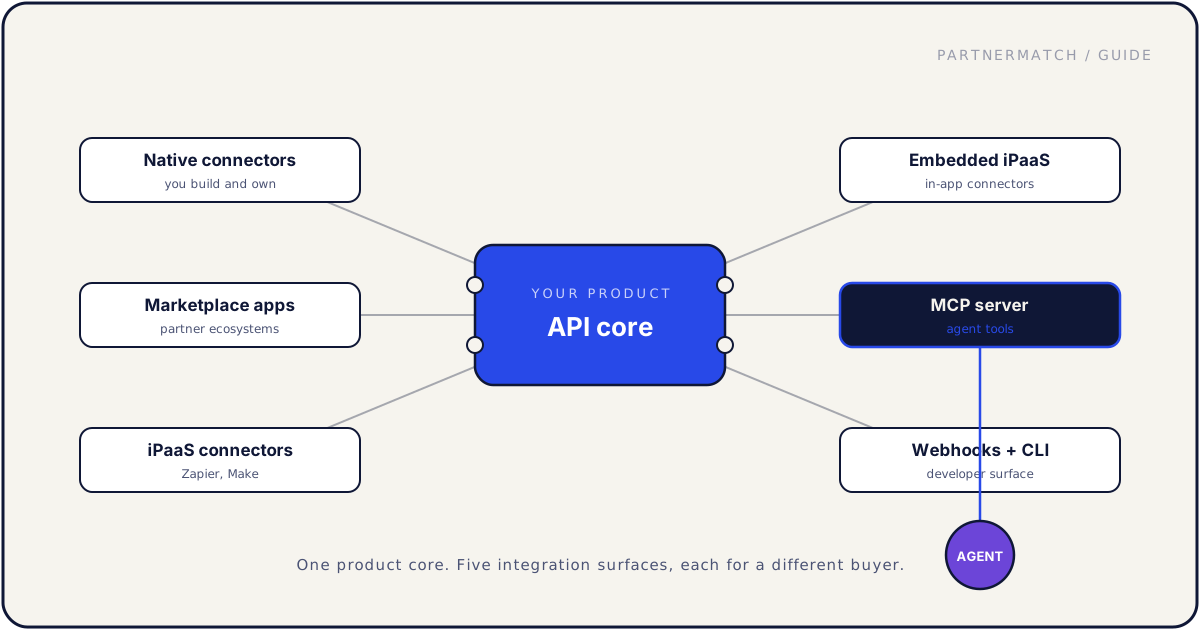
Most B2B SaaS teams do not decide on an integration strategy. They accumulate one. A native connector gets built because the biggest customer asked. A Zapier app appears because a growth person set it up over a weekend. Two years later there are nine integrations across four surfaces, no shared design, and nobody who can say which one a given customer should actually use.
That is the moment to start thinking about a SaaS integration portfolio: the full set of surfaces your product exposes to the outside world, who each surface is for, and how they hang together. Native connectors, marketplace apps, iPaaS connectors, embedded iPaaS, MCP servers for agents, and the developer surface of webhooks and a CLI are not competitors. They serve different buyers and they fail in different ways.
This guide covers the five integration surfaces a modern B2B SaaS can offer, how product and engineering should shape how connectors and third-party workflows behave, which surface fits which customer segment, a decision framework for build versus list versus expose, and how to keep the portfolio maintainable as it grows.
The 60-second version
If you only read one section, read this one:
- A SaaS integration portfolio has five surfaces: native connectors, marketplace apps, iPaaS connectors, embedded iPaaS, and MCP servers, plus webhooks and a CLI as the developer surface.
- Each surface serves a different buyer. Native is for your deepest accounts, iPaaS for the long tail, MCP for the AI assistant your customer already rolled out.
- Match the surface to where the work happens, not to whichever one a single loud customer named last quarter.
- Product owns the portfolio, engineering owns the platform. Without one owner per surface, connectors drift apart in error handling and sync behavior.
- Shared standards beat per-connector cleverness. One retry convention, one auth pattern, one error format across every connector you ship.
- Build native for depth, list on iPaaS for reach, expose MCP for agents. The decision framework is customer pull first, then technical users, then partner marketplace.
- A portfolio you cannot monitor is a portfolio you cannot trust. Shared internal platform, monitoring across surfaces, and a written deprecation policy keep it alive.
The five integration surfaces a modern SaaS can offer
Start with the map. Your product has one core, the API, and several ports off it. Each port is a surface with its own audience, its own discovery path, and its own build cost.
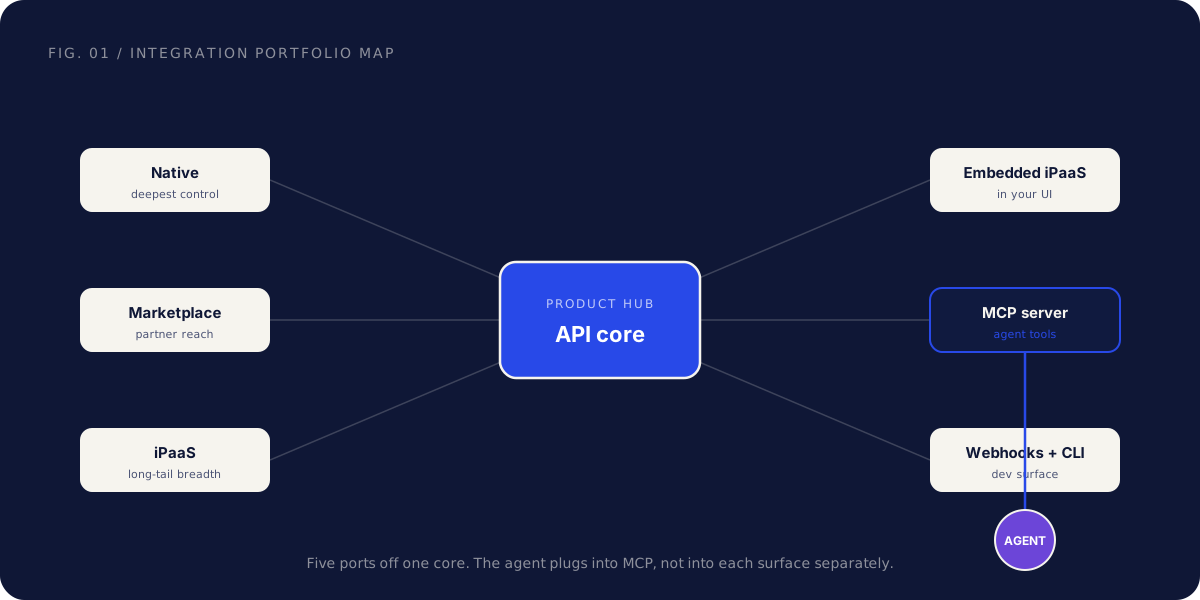
1. Native connectors. You build and host the integration yourself, end to end. The customer turns it on inside your product, configures it in your UI, and you own the whole experience. Native wins when the integration is core to your value or the partner is important enough that you want full control over how data moves and how errors surface. It is the most expensive surface to build and maintain, and the one your largest accounts judge you on.
2. Marketplace apps. A native integration that also lives as a listing inside a partner's ecosystem, like a CRM app store or a major platform marketplace. The build is similar to native, plus the partner's certification. The reason to do it is distribution: the listing keeps generating installs after launch, and being a verified app makes a seed-stage product look enterprise-ready. Marketplace wins when the partner runs an active program that actually sends leads, not just a directory page.
3. iPaaS connectors. Apps you publish on integration platforms like Zapier, Make, or Workato. You build one connector and the platform's users wire your product to thousands of others through their recipes. iPaaS wins for the long tail: the hundreds of tools individual customers want connected that you would never build natively. The build is light, the reach is enormous, and the depth is shallow, since you are limited to the platform's triggers and actions.
4. Embedded iPaaS. The same recipe-based model, but running inside your own product. The customer builds automations or picks from a connector catalog without leaving your UI, powered by an embedded integration platform under the hood. Embedded iPaaS wins when your customers want many integrations but you would rather keep the experience in your product than send people to Zapier.
5. MCP servers and agent tools. A server that exposes your product as tools an AI assistant can call on behalf of a user. The consumer here is not a developer or an ops person, it is a language model acting for someone inside an assistant. MCP wins when your customers are rolling out AI agents and expect those agents to use your product. We go deep on this in the guide to MCP for B2B SaaS; for the portfolio, treat it as one more surface competing for the same engineering time.
Plus the developer surface: webhooks and a CLI. Not a fifth product so much as the plumbing the others rely on. Webhooks let any integration react to events in your product instead of polling. A CLI gives developers and, increasingly, agents a scriptable way in. These are the cheapest surfaces to ship and they make every other surface better. The developer experience surface is worth getting right early because the rest of the portfolio sits on top of it.
Here is the same set in one view:
| Surface | Who you serve | Why it wins |
|---|---|---|
| Native connector | Your deepest accounts | Full control of UX, data flow, and roadmap |
| Marketplace app | A partner's audience | Distribution and credibility from the listing |
| iPaaS connector | The long tail of customer tools | Huge reach for a light build |
| Embedded iPaaS | Your own users, in your UI | Many integrations without building each one |
| MCP server | AI agents acting for users | Your product is usable inside assistants |
| Webhooks + CLI | Developers and agents | Event-driven plumbing every surface uses |
How product and engineering should shape connectors and third-party workflows
The surfaces are only half the story. The other half is how the connectors actually behave once they are live, and that is a product and engineering decision, not a per-integration accident.
Ownership first. Every surface needs a named owner. Not a committee, not "the integrations team" in the abstract. A specific person who owns the native connector roadmap, another who owns the iPaaS listings, another who owns the MCP server. Product owns what each surface is for and which connectors get built. Engineering owns the platform underneath. When ownership is fuzzy, connectors drift: one syncs every five minutes, the next every hour, and nobody can say why.
Shared design standards across connectors. A customer who uses two of your connectors should not have to learn two mental models. Decide once, then apply everywhere:
- Sync direction and conflict rules. Which system owns which field, which direction data flows, and what happens when both sides change the same record. Most integration bugs are unanswered ownership questions wearing a technical costume.
- Error format. Every connector should report failures the same way, in language a customer or support agent can act on, not a raw stack trace.
- Retry and backoff. One convention for transient failures across all connectors, so a partner API hiccup does not silently drop data in one surface while another recovers cleanly.
- Auth pattern. Per-user OAuth wherever possible, consistent token refresh, and revocation that works the same way everywhere.
Error handling is a product feature. When a sync fails, the customer should learn about it from your product, not from a missing record they discover three weeks later. Surface failures in the UI, alert the right person, and make the recovery path obvious. An integration that breaks loudly and recovers cleanly beats one that looks perfect until it silently stops.
Retry and sync conventions deserve a written spec. This is the document that keeps the third connector consistent with the first: sync intervals, what counts as a conflict and who wins, retry schedule, dead-letter behavior, and how each is surfaced to the user. Hand it to the engineer building connector number four and they should not have to guess.
The teams that get this right treat connectors and third-party workflows like any product surface. Defaults are deliberate, behavior is consistent, and the rules are written down before the code is.
Portfolio strategy: which surface for which customer and partner
Not every customer needs every surface, and building all five for everyone is how teams burn a year and ship nothing well. Map surfaces to segments and partner types instead.
| Customer segment | Partner type | Best surface | Why |
|---|---|---|---|
| Enterprise accounts | Strategic, core to workflow | Native connector | They expect depth, control, and a roadmap commitment |
| Mid-market | Big platform with a store | Marketplace app | Distribution plus the credibility of a verified listing |
| SMB and self-serve | Long tail of tools | iPaaS connector | They want their niche tools connected, cheaply |
| Power users inside your app | Many small connections | Embedded iPaaS | They build their own automations without leaving you |
| AI-forward teams | The assistant they rolled out | MCP server | Their agents need to use your product directly |
| Developer-heavy customers | Building on top of you | Webhooks + CLI | They want events and scripting, not a fixed recipe |
A few patterns fall out of this table.
Your first native connector should be the one your top accounts already move data through by hand. That is the highest-pull, highest-value build, and it sets the standard the rest of the portfolio follows. The same logic that ranks tech partnership targets applies here: customer pull and distribution upside decide the order, which is the core of our tech partnerships guide.
iPaaS and embedded iPaaS cover breadth without committing engineering to every request. When a customer asks for a tool you will never build natively, an iPaaS listing answers it for the cost of one connector that serves everyone.
Marketplace apps are a distribution decision, not a depth decision. List where your customers already shop for tools. If a partner's marketplace is a ghost town, the certification effort buys you a badge and little else. The full case for which stores to list in is in our SaaS marketplace strategy guide.
MCP earns its slot the moment AI enablement teams show up in your sales process or a competitor starts mentioning agent support in deals. Until then it competes for engineering time like any other surface.
A decision framework: build native vs list on iPaaS vs expose MCP
When a new integration request lands, you have three real options and they branch off the same first question. Walk the tree.
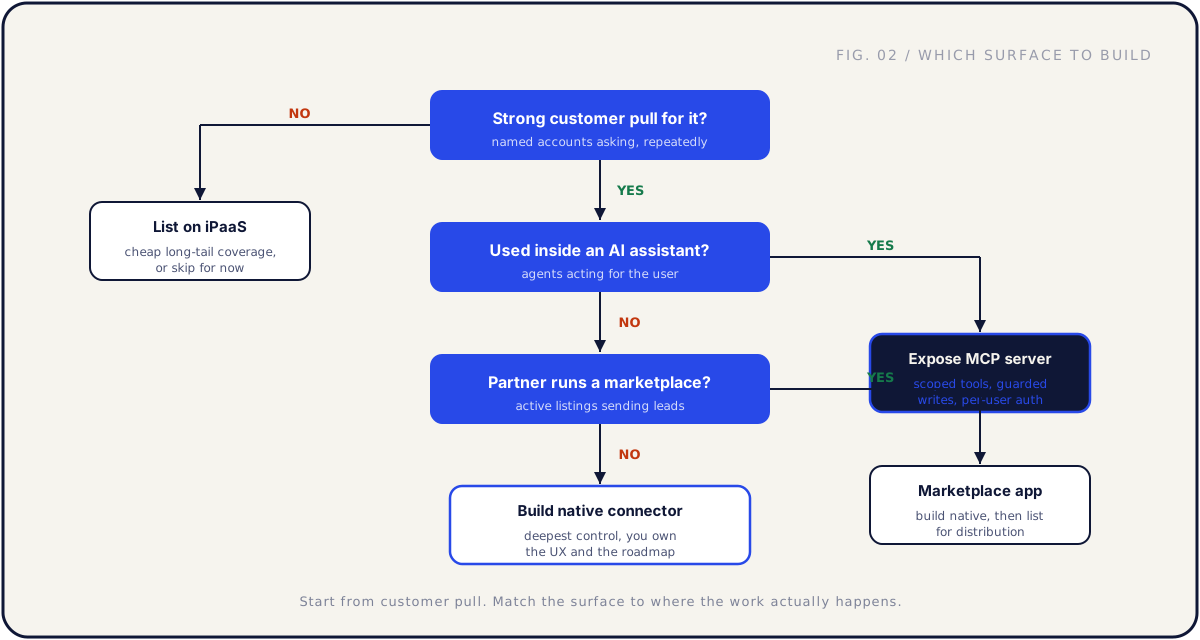
Is there strong customer pull? Not one passing mention. Named accounts asking, repeatedly, ideally with active deals attached. If the answer is no, list on iPaaS so the connection exists for the few who want it, or skip it for now. Do not commit native engineering to a request nobody is pulling for.
Is the work happening inside an AI assistant? If your customers run this workflow through an agent, expose an MCP server. The agent needs tools it can call, with scoped permissions, guarded writes, and per-user auth. A native connector does not help an agent that cannot reach it.
Does the partner run a real marketplace? If there is strong pull and the workflow is not agent-driven, check whether the partner has an active program that sends leads. If yes, build native and list it as a marketplace app for the distribution. If no, build a native connector and own the experience directly, because the depth is worth it even without the partner's store.
The framework is deliberately simple because the failure mode is overthinking it. Most teams already know which two or three integrations have real pull. The tree just keeps them from defaulting to a heavy native build when a light iPaaS listing or an MCP server is the better fit.
One nuance: these are not mutually exclusive over time. A core integration often starts native, gets listed in a marketplace for reach, and later gains an MCP surface so agents can drive it. The tree tells you where to start, not where to stop.
Where each surface lands on effort and reach
Two variables decide most of the prioritization: how much it costs to build and maintain, and how many customers it can reach. Plotting the surfaces against both makes the trade-offs obvious.
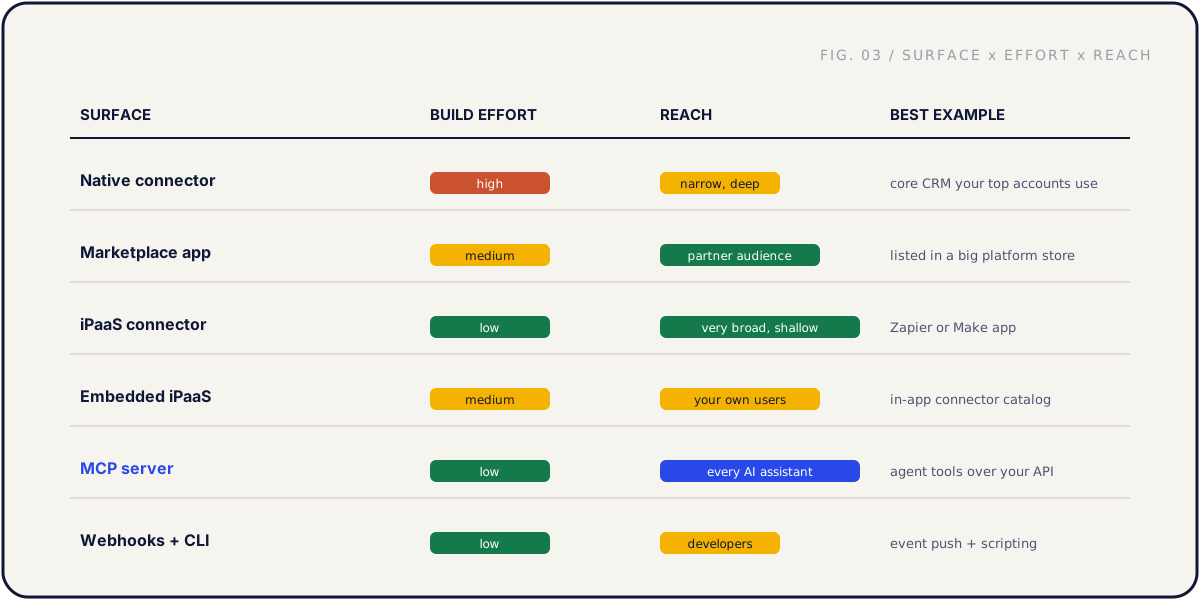
The shape to notice: native connectors are high effort and narrow reach, which is why you reserve them for integrations that matter most. iPaaS and MCP are low effort relative to their reach, which makes them efficient ways to cover breadth and the AI surface. Marketplace and embedded iPaaS sit in the middle.
This is also why a portfolio beats a pile of native connectors. If your only surface is native, every integration costs a quarter of engineering and you can build a handful a year. Spread across surfaces, you cover your deepest accounts natively, the long tail through iPaaS, the AI surface through MCP, and your developer-heavy customers through webhooks and a CLI.
A practical sequencing for most seed to Series B teams: get the API and webhooks clean first, build one native connector for your top workflow, publish an iPaaS connector for breadth, then add an MCP server when AI pull appears. Embedded iPaaS and a second native connector come once the first surfaces are proven.
Keeping the portfolio maintainable
A portfolio that ships is not the same as a portfolio that survives. The thing that kills integration strategies is not the first launch, it is the slow accumulation of connectors nobody maintains until one breaks during a customer's renewal.
Build a shared internal integration platform. The connectors customers see are different surfaces, but underneath they should share machinery: auth and token handling, retry and backoff logic, the error format, logging, and the sync engine. Build that once and every new connector gets cheaper and more consistent. Build each one as a one-off and your maintenance cost grows linearly with your integration count, which is how teams end up afraid to ship the next one.
Monitor across surfaces, not per connector. You want one view that answers a single question: is the whole portfolio healthy right now? Sync recency, error rates, auth health, and partner API status, across every surface, in one place.
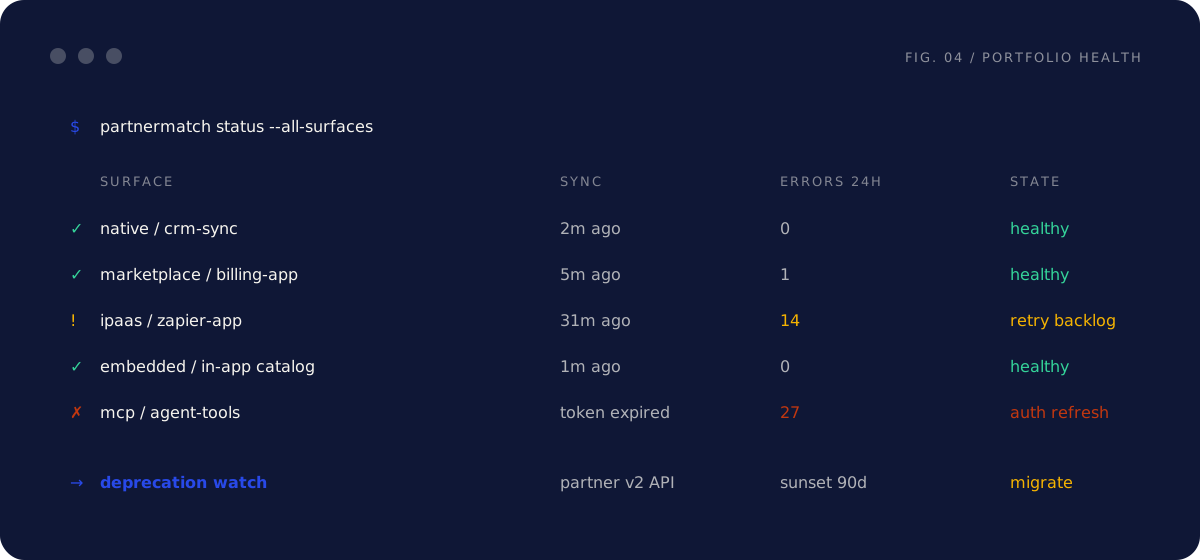
The point of the single view is that the first person to notice a broken integration should be you, not a churn-risk customer. A token expiry on your MCP surface and a retry backlog on a Zapier app are both portfolio problems, and both should page someone before a customer files a ticket.
Write a deprecation policy before you need one. Partners sunset API versions, you retire connectors nobody uses, and platforms change their rules. A written policy decides in advance: how much notice customers get, where it appears, what the migration path is, and who owns the cutover. Without it, every deprecation becomes a fire drill, and a few become churn.
Review the portfolio on a schedule. Quarterly is enough. Which connectors have real adoption, which are silently broken, which partner APIs are about to change, and which surface the next request belongs on. The review is also when you retire dead weight. A connector with no active users is maintenance cost with no return, and removing it is as legitimate a portfolio decision as building one.
Common mistakes, and the fix
Treating every request as a native build. The fix: run it through the decision tree. Most requests are better served by an iPaaS listing or an MCP server, and reserving native engineering for high-pull workflows is what keeps the portfolio affordable.
Letting connectors drift apart in behavior. The fix: shared design standards and an internal integration platform. One retry convention, one error format, one auth pattern across every surface, enforced by shared machinery rather than discipline.
Confusing reach with depth. The fix: match the surface to the buyer. A broad iPaaS listing does not replace the deep native connector your largest account needs, and a native connector does not give you the long-tail breadth of iPaaS. You usually want both, for different segments.
Shipping surfaces you cannot monitor. The fix: monitoring across surfaces from day one. If you cannot see the health of every connector in one view, you are trusting that nothing breaks, and partner APIs break without asking.
No owner per surface. The fix: name one. Product owns what each surface is for, engineering owns the platform, and each surface has a person who can make the call. Portfolios without owners lose every prioritization argument to the loudest customer of the week.
FAQ
Do we need all five surfaces? No, and trying to is a mistake at seed to Series B. Most teams start with a clean API and webhooks, one native connector for their top workflow, and an iPaaS listing for breadth. Add MCP when AI pull appears and the rest as customer demand justifies them. The portfolio grows with the company, it does not arrive complete.
Native connector or iPaaS for a given integration? Customer pull and depth decide it. If named accounts are asking and the workflow is core to your value, build native for the control and the experience. If it is a long-tail tool that a few customers want connected, an iPaaS listing answers the request for a fraction of the cost. When in doubt, list on iPaaS first and promote to native only if adoption proves the demand.
Is an MCP server just another connector? No. The consumer is a language model acting for a user, not a developer or an ops person, which changes how you design every tool. Reads can be generous, writes need guards and confirmation, and tool descriptions are the interface. It belongs in the portfolio, but it gets designed differently. The full treatment is in our MCP for SaaS guide.
Should we build our own integration platform or buy one? For the iPaaS surface, buy: Zapier, Make, and embedded iPaaS vendors exist so you do not have to build a recipe engine. For your native connectors, build a thin internal platform that standardizes auth, retries, errors, and monitoring across them. Shared machinery for the connectors you own, not reinventing the platforms you can rent.
How do we keep this many integrations from becoming a maintenance burden? A shared internal platform so connectors share machinery, monitoring across all surfaces, a written deprecation policy so partner changes are routine instead of fire drills, and a quarterly review where you retire dead connectors. The burden comes from one-off connectors with no shared foundation.
Who owns the integration portfolio? Product owns the strategy: which surfaces exist, what each is for, and which connectors get built. Engineering owns the platform underneath. Each surface needs a named owner. At seed to Series B that is often a founder or product leader with part-time focus, not a dedicated team yet.
Where do webhooks and a CLI fit if they are not customer-facing integrations? They are the developer surface the rest of the portfolio relies on. Webhooks let every connector react to events instead of polling, and a CLI gives developers and agents a scriptable way in. Getting the developer experience surface right early pays off across the whole portfolio.
How many integrations should we ship in year one? Fewer than the request list suggests. One well-built native connector, one iPaaS listing, and an MCP server when pull appears is a strong year. One shipped, monitored, adopted integration on each surface beats a dozen half-built ones.
Further reading
- Model Context Protocol — the open standard for exposing your product to AI agents.
- OpenAPI Initiative — describe your API once and generate connectors, SDKs, and docs from one spec.
The short version
A SaaS integration portfolio is a set of deliberate choices, not an accumulation of accidents. Five surfaces, native connectors, marketplace apps, iPaaS, embedded iPaaS, and MCP servers, plus the developer surface of webhooks and a CLI, each serving a different buyer and failing in a different way.
Match the surface to where the work happens. Build native for your deepest accounts, list on iPaaS for the long tail, expose MCP for the agents your customers already run, and let marketplace listings carry distribution. Run new requests through the decision tree, give every surface an owner, standardize how connectors behave, and keep the whole thing monitored with a written deprecation policy.
If you want help deciding which surfaces your product actually needs, which integration to build first, and how to keep the portfolio maintainable as it grows, that is exactly what a Partner Audit is for. We review your product, API, and partner potential, then define what to build, who to approach, and how to ship it.