Why your B2B SaaS needs a CLI: developer experience as a partnership asset
A SaaS CLI is the cheapest proof your API is real. What belongs in a v1, build versus generate, and how a CLI speeds up partner integrations and agents.
Somewhere right now, an engineer at a company you want to partner with is deciding whether your product is real. Not your pitch deck, not your G2 reviews. Your product, as infrastructure they might build on. The fastest way they answer that question is to type something into a terminal and see what comes back.
A SaaS CLI is the cheapest, most credible developer experience asset a B2B SaaS startup can ship. It costs a fraction of an SDK program, it proves your API works end to end, and in 2026 it serves an audience that did not exist five years ago: AI agents that operate software by running commands.
This post makes the case for a CLI as a partnership asset: what it signals, what belongs in a v1, whether to hand-roll or generate it, how to measure it, and how it compresses partner integration timelines from weeks to days.
The 60-second version
- Developers and AI agents both prefer scriptable interfaces. A CLI serves both with one investment.
- A CLI is the cheapest proof your API is real: it cannot be faked the way a docs page can.
- To partners, a CLI signals API maturity, docs discipline, and automation-friendliness before a single call.
- A v1 needs auth login, 5 to 10 core commands, JSON output, honest exit codes, and good --help. Nothing more.
- Consistent flags and machine-readable output make your product agent-operable, not just human-usable.
- Generate the long tail from OpenAPI, hand-roll the top commands. Most teams should not pick one or the other.
- Measure weekly active CLI users, scripts in CI, and partner integrations prototyped against it.
Why a SaaS CLI still matters in 2026
The terminal was supposed to be obsolete a decade ago. Instead, the opposite happened. Engineers live in terminals more than ever, CI/CD runs everything through shell commands, and the newest class of users, AI coding agents, interact with software almost exclusively by executing commands and parsing output.
A CLI matters for a simple structural reason: it is scriptable. A web dashboard can demo a feature; a CLI can be embedded in a deploy pipeline, a cron job, a migration script, or an agent loop. Every workflow your customers automate with your CLI is a workflow that becomes infrastructure, and infrastructure does not churn.
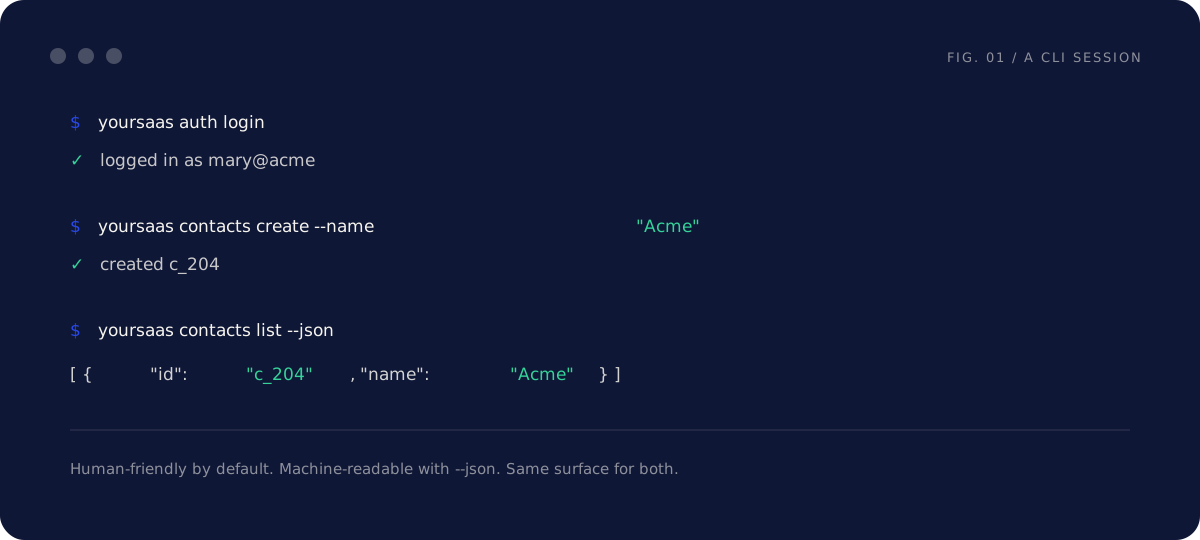
There is also a credibility mechanic that founders underestimate. Documentation describes an API. A CLI demonstrates one. When an engineer runs yoursaas auth login and then creates a real object from their terminal thirty seconds later, they have verified your auth flow, your API, and your error handling in one motion. No claim you make in a partner meeting carries as much weight as that thirty seconds.
And the cost asymmetry is in your favor. A serious SDK program means maintaining libraries in four languages. A v1 CLI is one binary, one language, wrapping endpoints you already have.
What a CLI signals to partners
Before a partner's engineering team writes a line of integration code, they estimate how painful you will be to work with. A CLI shifts that estimate in your favor on three fronts:
API maturity. A CLI consumes your public API the same way a partner will. If the CLI can do something, the API can. Gaps between your product and your API become visible internally long before a partner finds them, because your own CLI hits them first.
Docs discipline. A CLI with good help text is documentation that cannot drift. --help ships with the binary, versioned with the behavior it describes. Partner engineers notice this, because they have all been burned by docs pages describing an API two versions ago.
Automation-friendliness. A team that ships JSON output and meaningful exit codes is a team that thinks about being built upon. That is exactly the trait a partner is trying to detect, and it is hard to fake.
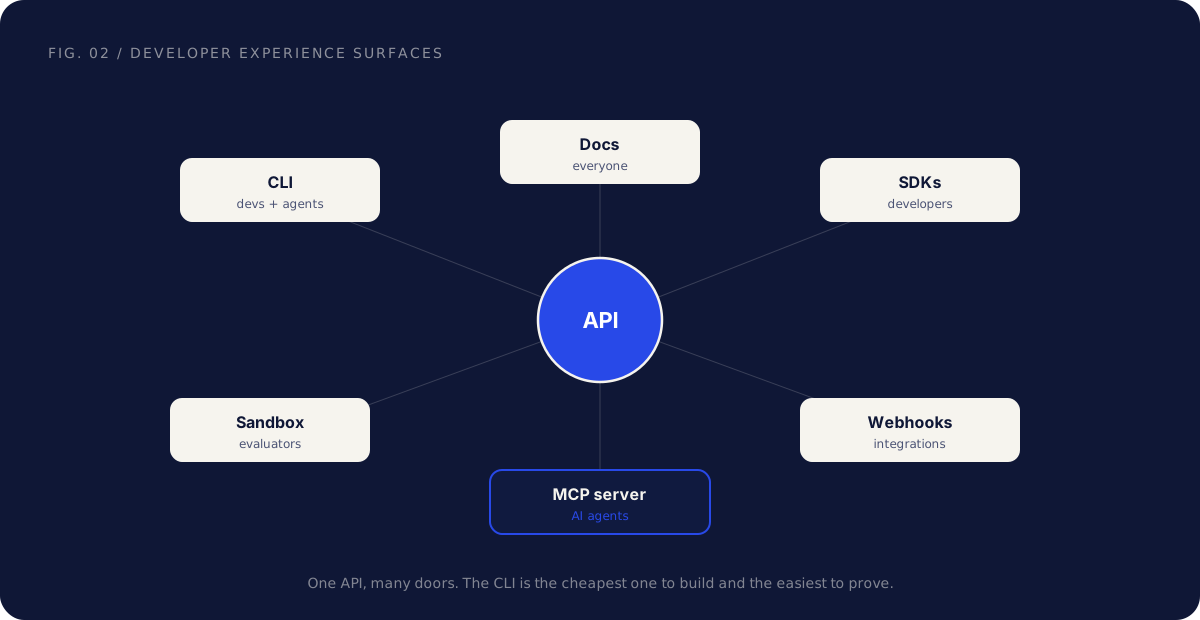
The map above is worth internalizing: your API is one product with many surfaces, and each surface serves a different audience. Docs serve evaluating engineers. The sandbox serves prototypes. Webhooks serve running integrations. The CLI is unusual because it serves two audiences at once, human developers and automated agents, which is why it punches above its weight. We cover the documentation surface in depth in how to make your API partner-ready.
What belongs in a v1 SaaS CLI
The biggest CLI mistake is scoping it like a platform. A v1 CLI is small, and its smallness is the point. Five things belong in it:
1. An auth login flow that just works. yoursaas auth login should open a browser, complete the OAuth dance, and store the token securely. Also support an environment variable token for CI, where there is no browser. If login takes more than a minute, nothing after it matters.
2. Five to ten commands mapping to your core API resources. Not your whole API surface. The objects customers actually automate: contacts list, contacts create, events send, webhooks create, whatever your equivalents are. Follow the noun-verb pattern consistently and resist every temptation to get clever with it.
3. A JSON output mode. Human-readable tables by default, --json for exact, parseable output on every command, not just some. This one flag is what turns your CLI from a toy into an automation surface, because everything downstream, scripts, pipelines, and agents, depends on it.
4. Honest exit codes. Zero on success, non-zero on failure, every time. A CLI that prints an error message and exits 0 will silently corrupt someone's deploy pipeline, and they will remember you for it.
5. --help that teaches. Every command documented with a one-line description and a realistic example. Assume the reader has never seen your product, because the most important reader, the partner engineer evaluating you, never has.
Things that do not belong in a v1: interactive wizards, a plugin system, config file inheritance, theming. Ship the boring version. The teams that use it will tell you what is missing.
Developer experience is now agent experience
Here is the shift that makes a CLI more valuable in 2026 than it was in 2019: a growing share of your CLI's users are not people.
AI coding agents and operations agents do their work by running commands and reading output. When a customer asks an agent to "set up our staging webhooks," the agent looks for a scriptable path. If your product has a CLI with predictable flags and JSON output, the agent can operate your product reliably. If your product is dashboard-only, the agent is reduced to screen-driving a web UI, which is slow and brittle, and the customer experiences your product as the one their tooling fights with.
This is the same usage pattern as CI pipelines and shell scripts, just with a new operator. The requirements are identical:
- Consistent flag conventions across commands, so one learned pattern generalizes.
- Machine-readable output with stable field names that are versioned like the API they reflect.
- Deterministic exit codes, because agents branch on them.
- Errors on stderr with actionable messages. "Missing required scope: write:contacts" lets an agent fix the problem. "Something went wrong" ends the run.
Notice that none of this is AI-specific work. It is classic Unix discipline, and it pays for itself with human users even if agents never touch your product. The agent wave just raises the return on work you should have done anyway.
A CLI is one of two scriptable surfaces agents reach for. The other is an MCP server, which exposes your API to AI assistants natively. They are complements, not competitors, and we cover the second in MCP for SaaS.
Build, buy, or generate
The classic objection to a CLI is engineering cost. In 2026 that objection is mostly stale, because you no longer have to choose between hand-crafting everything and shipping nothing. If you maintain an OpenAPI spec, generators can produce a working CLI from it in days.

The trade-offs:
| Hand-rolled | Generated from OpenAPI | |
|---|---|---|
| Time to v1 | Weeks | Days |
| Command ergonomics | Designed around workflows | Mirrors API shapes, can feel mechanical |
| Coverage | Whatever you build | The whole spec, automatically |
| Drift risk | Drifts from the API unless maintained | Regenerates with the spec |
| Auth and login UX | As good as you make it | Often needs custom work anyway |
| Best for | The 5 to 10 commands people use daily | The long tail of endpoints |
The practical answer for most B2B SaaS startups is both: generate the long tail from your OpenAPI spec so coverage is never the gap, then hand-roll the login flow and the handful of high-traffic commands where ergonomics earn their keep. A generated contacts create is fine. A generated auth flow is usually not.
There is a useful side effect hiding here: generating a CLI forces your OpenAPI spec to be accurate, because every spec error becomes a visibly broken command. Teams regularly discover their spec was aspirational the first time they generate from it. That correction alone is worth the exercise, and it benefits every other consumer of the spec, including partners and agents.
Measuring CLI success
A CLI is a product surface, so measure it like one. Three metrics matter, in increasing order of value:
Weekly active CLI users. The basic pulse. Distinguish human sessions from CI tokens if you can, because they tell different stories: humans mean adoption, CI means infrastructure.
Scripts in CI. When your CLI shows up in customers' pipelines, your product has crossed from "tool someone uses" to "step in how the company ships." This is the retention signal. A customer with your CLI in their deploy pipeline does not churn casually, because churning means editing their pipeline.
Partner integrations prototyped against it. The partnership metric. Ask partner engineers how they explored your API, and count the ones who started with the CLI. Every one of those is an evaluation that went faster and a first impression you controlled.
Useful counter-metric: support tickets that begin with CLI output pasted in. That sounds bad and is actually good. Users debugging with your CLI send you exact commands and exact errors, which cuts ticket resolution time and tells you where the API confuses people.
How a CLI accelerates partner integration projects
Everything above compounds in one specific place: the partner integration project. Here is the difference in practice.
Without a CLI, a partner engineer's first day looks like this: read the docs, register an app, write a small script to test auth, debug the token refresh, write another script to call two endpoints, and end the day with maybe one working request and a list of questions for your team.
With a CLI: install, auth login, and within minutes they are listing real objects from the sandbox, piping --json output into the tool they are integrating, and confirming data shapes against reality instead of documentation. The questions they send you on day one are scoping questions, not plumbing questions.
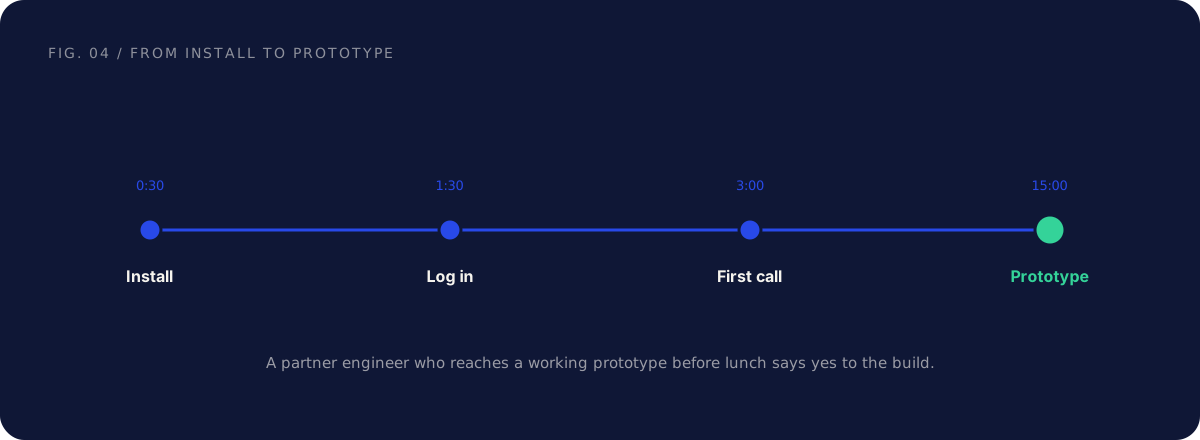
That speed changes the project economics on both sides. The partner's estimate shrinks because the unknowns shrink, which moves your integration up their priority list. Your own team answers fewer setup questions and spends the saved time on the scope. And when the build starts, the CLI keeps paying: it becomes the reference implementation both teams use to reproduce issues. "Run this command, send me the output" beats a screen-share every time.
A CLI does not replace partner-ready documentation, a sandbox, or a real scope document. It multiplies them. The full checklist for the documentation side is in how to make your API partner-ready, and the playbook for running the build itself is in integration project management.
Common mistakes, and the fix
Scoping the v1 like a platform. The fix: ship auth login, your top commands, JSON output, and exit codes. A small CLI that works beats a roadmap. Add commands when usage data asks for them.
Shipping a CLI without a JSON mode. The fix: --json on every command from day one. Without it, scripts parse your human-readable tables, and every formatting tweak you ship breaks someone's pipeline.
Treating the CLI as a side project with no owner. The fix: the CLI belongs to whoever owns the API, versioned and released with it. An abandoned CLI that lags the API two versions signals the opposite of everything you built it to signal.
Inconsistent commands and flags. The fix: pick a noun-verb convention and shared flag names (--json, --workspace, --limit) and enforce them in review. Inconsistency taxes every user on every command, and it confuses agents even faster than it confuses people.
Building it and telling no one. The fix: put the CLI in your docs quickstart, your partner onboarding, and your marketplace listings. Its highest-value moment is a partner engineer's first ten minutes with your product, so make sure it is the first thing they see.
FAQ
Is a CLI worth it for a seed-stage SaaS? Usually yes, with the v1 scope above. The investment is weeks, not months, especially if you generate from an existing OpenAPI spec. The signal it sends to partners and technical evaluators is far larger than the engineering cost.
We have an API and docs. Why do we need a CLI too? Docs describe, a CLI demonstrates. An engineer can verify your entire auth flow and core API in two minutes with a CLI, versus an afternoon of scripting without one. It also serves CI pipelines and AI agents, which docs alone cannot.
Should the CLI come before or after SDKs? Before, for most B2B SaaS. One CLI serves every language community at once, while each SDK serves one. Ship SDKs when specific partner or customer segments ask for them by language.
What language should we build it in? Whatever your team maintains best, with one constraint: distribute a self-contained binary so users do not need your language runtime installed. Go and Rust make this trivial, which is why so many CLIs use them, but a packaged Node or Python CLI is fine if that is where your team is fast.
How does a CLI relate to MCP and AI agents? They are sibling surfaces. A CLI makes your product operable by anything that can run a command, including agents in code environments. An MCP server exposes your API to AI assistants as native tools. Both depend on the same foundation: a clean API with stable, documented shapes. Start with whichever your users reach first, and see MCP for SaaS for the other half.
Do partners really care whether we have a CLI? Partner engineers do, and they write the internal memo that decides your deal's priority. A CLI rarely appears on a partnership term sheet, but it shows up earlier, in the estimate: faster evaluation, fewer unknowns, smaller number next to your integration.
How do we version the CLI against the API? Release them together. The CLI should declare which API version it targets, warn on mismatch, and follow the same deprecation windows you publish in your API changelog. A CLI that silently breaks against your own API is a public demo of your versioning discipline failing.
What does success look like in the first quarter? Modest and concrete: the CLI in your quickstart, a few dozen weekly active users, the first customer CI pipeline using it, and one partner engineer who prototyped with it before a scoping call. Each of those compounds from there.
Further reading
- OpenAPI Initiative — describe your API once and generate a CLI, SDKs, and docs from it.
- OpenAPI Generator — open-source tooling to generate clients and a CLI from an OpenAPI spec.
The short version
A CLI is developer experience distilled to its cheapest, most credible form. It proves your API is real, it signals maturity to the partner engineers who grade you in their first ten minutes, and it makes your product operable by the scripts, pipelines, and AI agents that increasingly do the integrating.
Keep the v1 small: auth login, five to ten core commands, JSON output, honest exit codes, help text that teaches. Generate the long tail from your OpenAPI spec, hand-roll the commands that matter, and measure it like a product.
If you are getting your platform ready for partners, the CLI is one piece of a larger readiness picture: docs, sandbox, auth, webhooks, and the partner motion around them. A Partner Audit reviews all of it and gives you a prioritized plan for what to build, what to fix, and which partners to approach first.