The partner enablement kit: a checklist of what to give every partner
A partner enablement kit checklist for B2B SaaS: every asset to ship with a new partnership, what good looks like, how to organize it, and a v1 vs full version.
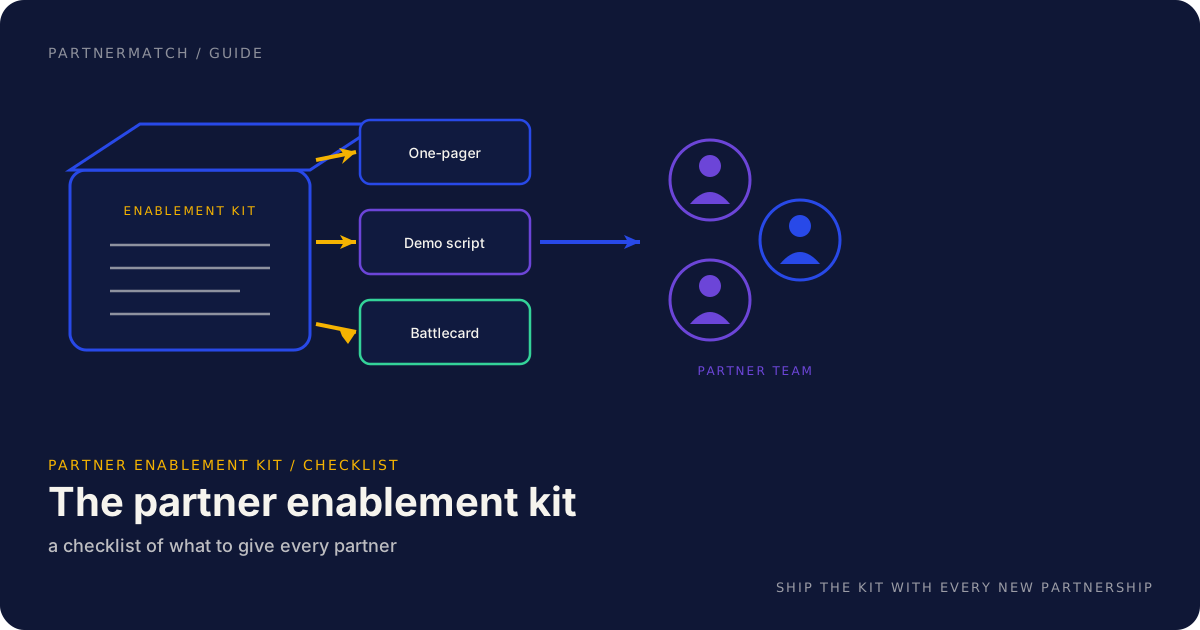
You sign a partner, you run a kickoff, and someone asks the obvious question: what do we send them? The honest answer at most startups is a Slack message with three links, a deck that is half a quarter out of date, and a promise to "put something together." That promise rarely gets kept, and the partner's sellers are left to reconstruct your pitch from memory. A partner enablement kit is what you send instead.
A partner enablement kit is the packaged set of assets a partner's team needs to pitch, sell, and support your product without you in the room. It ships with every new partnership, the same way a setup guide ships with hardware. This guide is not the overview of why enablement matters; for that, read partner enablement 101. This one goes deep on the contents: exactly what goes in the partner enablement kit, what good looks like for each piece, how to organize it so nobody pitches a stale version, who at the partner uses which asset, and how to scale from a lightweight first kit to a full one.
At the end you get a copyable checklist you can lift straight into your own kit. That is the point of this post. Save it, fork it, and ship it with your next partner.
The 60-second version
If you only read one section, read this one:
- A partner enablement kit is the packaged set of assets a partner's team needs to pitch, sell, and support you. It ships with every new partnership, not eventually.
- A strong kit covers three audiences: sales, technical, and marketing. A kit built only for sellers stalls the moment a technical buyer or a support ticket shows up.
- The core contents are knowable: one-pager, pitch and deck, demo script, technical overview and setup guide, FAQ, battlecard, ICP and qualifying questions, pricing summary, co-marketing assets, and an intro or deal-registration process.
- Each asset has a "what good looks like" bar. A one-pager written for the partner's customer, a demo a rep can give themselves, a battlecard that names the real alternatives.
- Organize it as a single source of truth. One versioned location, every channel pointing at it, old copies retired.
- Map assets to roles. Sales, solution engineers, support, and marketing each pull different things from the same kit.
- Keep it current. A product change that breaks the demo or the pricing should update the kit in the same motion.
- Start with a v1. Six assets for a first partnership beats a twenty-asset library you never finish. Add depth once the motion produces deals.
What a partner enablement kit is, and why it ships with every partnership
The partner enablement kit is the deliverable that turns a signed agreement into a partner team that can actually sell you. Enablement, as a discipline, is the journey of onboarding, training, certifying, and refreshing a partner's people. The kit is the artifact at the center of that journey, the thing every training session, QBR, and self-serve hub points back to.
Think of it the way you think of a product's onboarding. You would not ship software with no setup guide and expect customers to figure it out. A partnership is the same. The partner's sellers are busy people carrying their own quota, and they will not reverse-engineer your pitch from a logo on a slide. The kit is how you hand them a working pitch instead of a homework assignment.
The reason it ships with every partnership, not just the big ones, is that the failure mode is identical at every size. A partner with no kit goes quiet. Their reps cannot explain you, so they never bring you up, so no deals appear, so everyone assumes the partnership is "early" when it is actually stalled. A kit is the cheapest insurance against that silence. Build it once, template it, and it becomes the default thing you ship the week an integration goes live.
| Without a kit | With a kit |
|---|---|
| Reps reconstruct your pitch from memory | Reps open a one-pager and a demo script |
| Every training starts from a blank page | Training walks through assets that already exist |
| Stale claims spread through forwarded decks | One versioned source everyone points at |
| The partner goes quiet and nobody knows why | The partner has what they need to bring you up |
The mindset that makes this work: the kit is a product, and the partner's sellers are its users. Build it for them, not for you.
The full contents of a strong kit
A strong partner enablement kit is not a single document, it is a small library organized so a busy rep can find the one thing they need in the moment they need it. The cleanest way to organize it is by the audience at the partner: sales, technical, and marketing. Each group has a job to do in a deal, and each pulls different assets from the kit.
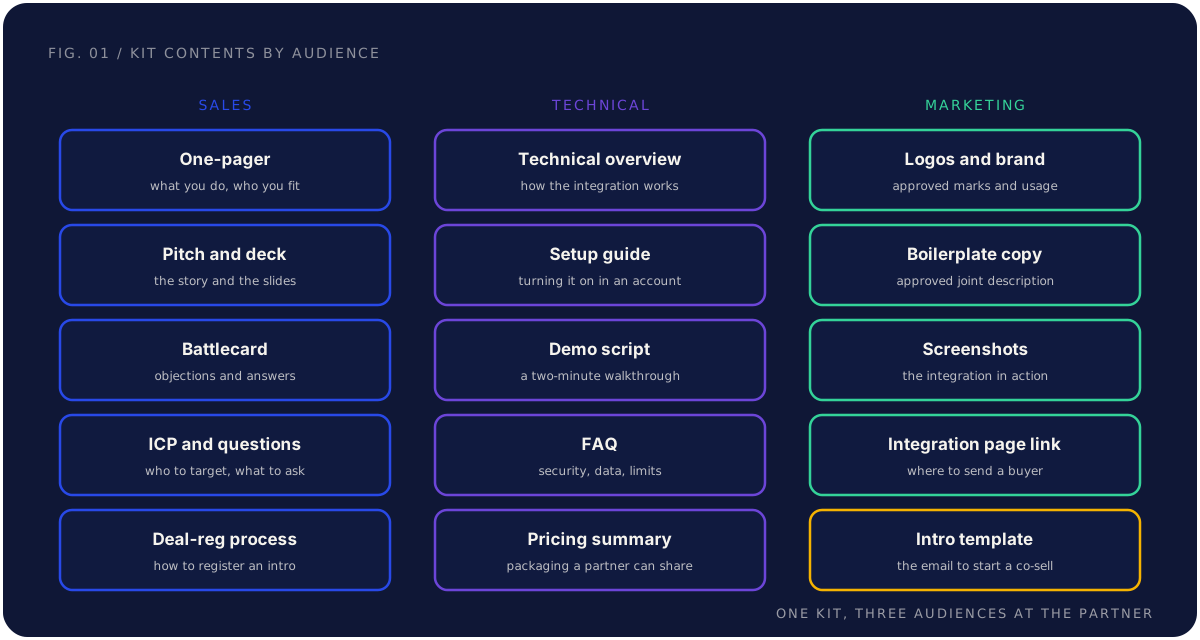
Here is the full inventory, with what good looks like for each. This is the heart of the kit, so it is worth being specific.
Partner one-pager. A single page that says what your product does, who it fits, and the joint value with this partner. Good looks like leading with the partner's customer and the partner's deal, not your feature list. A seller scanning it should know which of their customers you are for. If your one-pager reads like your homepage, rewrite it for the partner's interest.
Pitch narrative and deck. The short story a seller tells, plus the three to five slides that back it. The narrative names the customer signal that means you belong in the conversation, because timing is half the battle. Good looks like a rep delivering it from memory in two minutes, with the deck supporting rather than replacing it. A forty-slide master deck is not a pitch.
Demo script or recorded demo. A repeatable walkthrough of the one core workflow that proves the value. Good looks like a script a rep can perform themselves, not just a video they forward. A recorded demo is a fine backup for async buyers, but a rep who can drive the demo live is worth ten who can only press play.
Technical overview and integration setup guide. A plain-language explanation of how the integration works, plus the concrete steps to turn it on in a real account. Good looks like an overview that answers "how does this fit our stack and is it safe," and a setup guide specific enough that a solution engineer can follow it without opening a support ticket. This is where deals die quietly, so do not skimp.
FAQ. The questions a partner's buyer actually asks: data handling, security, limits, scale, and what it costs to run. Good looks like real answers to real objections, not marketing copy. If your sales team keeps a list of the hard questions buyers ask, that list is your FAQ.
Battlecard. The objections, the real alternatives, and how a rep responds to each. Good looks like naming the actual competitors and the honest trade-offs, because a battlecard that pretends you have no competition is one a rep will not trust.
Ideal-customer profile and qualifying questions. Who you are for, and the two or three questions a partner rep can ask to know whether you fit this deal. Good looks like a tight ICP the rep can hold in their head and questions phrased the way a seller would actually ask them. This is what stops a rep from pitching you into deals you will lose.
Pricing and packaging summary. A short, shareable explanation of how you are priced, written so the partner can give it to a customer. Good looks like enough for the rep to set expectations without quoting a number they will have to walk back, and clear about where the conversation hands back to you.
Co-marketing assets. Approved logos, brand usage notes, boilerplate copy describing the joint solution, screenshots of the integration, and a link to the integration page. What good looks like: a self-contained pack the partner's marketing team can use without emailing you for the logo every time. This is where the kit overlaps with the broader SaaS co-marketing playbook, which goes deep on how those assets get used at scale.
Intro or deal-registration process. The lightweight, written process for how a partner rep registers an intro or starts a co-sell, including the template email and where it goes. What good looks like: one page, no friction, and a fast response on your side. This is the on-ramp to the co-selling engine; if registering an intro is painful, reps stop doing it.
| Asset | What it is | What good looks like |
|---|---|---|
| One-pager | Product, fit, joint value on a page | Written for the partner's customer, not your homepage |
| Pitch and deck | The story plus three to five slides | Delivered from memory in two minutes |
| Demo script | A walkthrough of one core workflow | A rep can give it themselves, live |
| Technical overview | How the integration works | Answers "does it fit our stack and is it safe" |
| Setup guide | Turning it on in a real account | An SE can follow it without a ticket |
| FAQ | The questions buyers actually ask | Real answers, not marketing copy |
| Battlecard | Objections and alternatives | Names the real competitors honestly |
| ICP and questions | Who you fit, what to ask | A tight profile the rep can hold in mind |
| Pricing summary | How you are priced and packaged | Shareable without quoting a number to retract |
| Co-marketing assets | Logos, boilerplate, screenshots | A self-contained pack marketing can use |
| Intro process | How to register a co-sell | One page, fast response, no friction |
How to organize the kit: one source of truth
A kit that exists in eleven scattered files is not a kit, it is a scavenger hunt. The discipline that makes the contents usable is organization: a single source of truth that is versioned and easy to find.
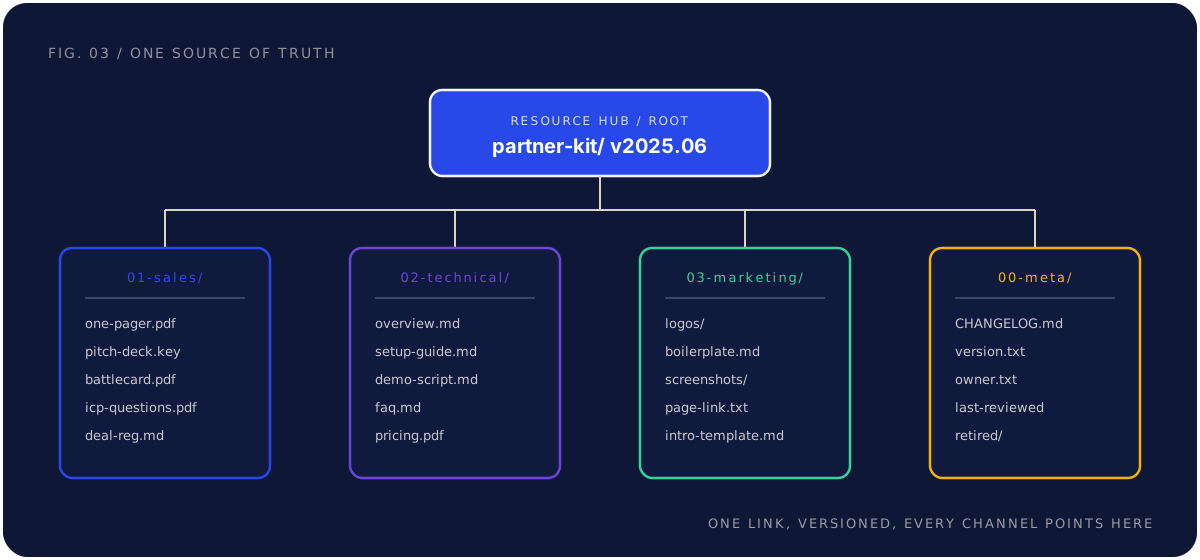
Single source of truth means one canonical location, and every channel points at it rather than copying it. When the demo script changes, you change it in one place and every rep sees the new version on their next visit. The failure mode to design against is the forwarded copy: a PDF a rep downloaded in March, a deck a manager emailed, a slide frozen at a different moment and quietly wrong. One location kills that.
Versioned means it is obvious what is current. Put a version stamp and a last-reviewed date on the kit, keep a short changelog, and move retired assets into a clearly marked archive instead of deleting them. A rep should never have to wonder whether the file they are looking at is the live one.
Easy to find means the structure maps to how people use it. Group by audience or by asset type, name files predictably, and keep a top-level index so a new rep can self-serve on day one. The structure below is one workable layout, with a meta section that carries the version, owner, and changelog so the kit stays honest.
| Section | What lives there | Who reaches for it |
|---|---|---|
| 00-meta | Version, changelog, owner, last-reviewed, retired assets | The kit owner |
| 01-sales | One-pager, pitch, deck, battlecard, ICP, deal-reg | Sales reps |
| 02-technical | Overview, setup guide, demo script, FAQ, pricing | Solution engineers |
| 03-marketing | Logos, boilerplate, screenshots, page link, intro template | Marketing |
One more rule: the kit needs a named owner. Not a team, a person. The most common reason a kit rots is that everyone assumed someone else was keeping it current. Put one name on it.
Who at the partner uses which asset
A partner is not one audience. The seller, the solution engineer, the support agent, and the marketer each have a different job in a deal, and each reaches for different parts of the kit. Designing the kit around those roles is what stops you from building everything for the seller and leaving the rest exposed.
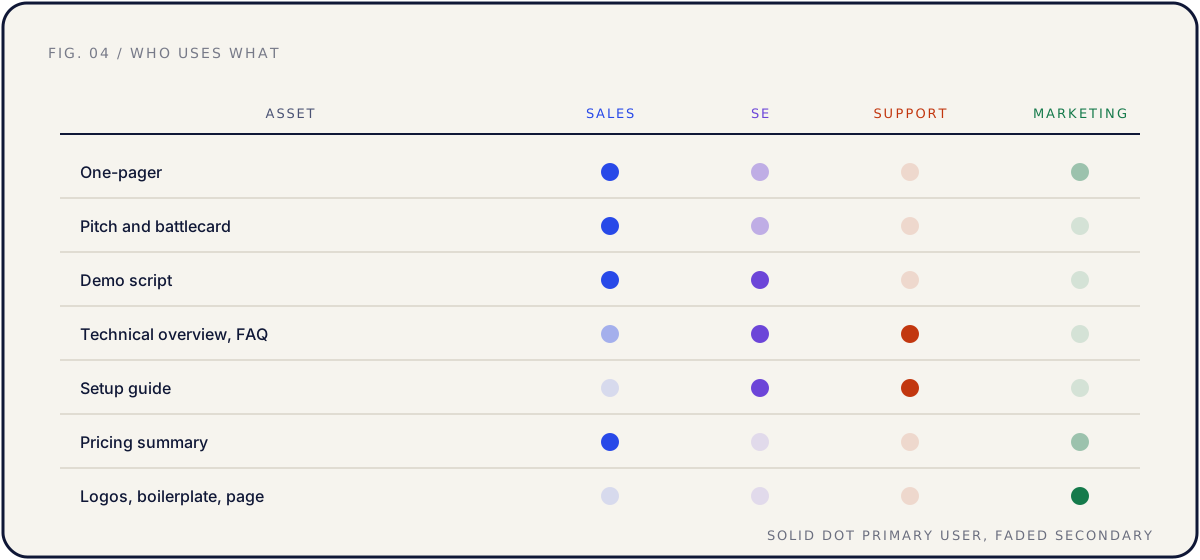
The seller opens the deal, so they live in the one-pager, pitch, battlecard, ICP, and pricing summary. The solution engineer wins the technical buyer, so they need the technical overview, setup guide, demo script, and deeper FAQ. Support protects the relationship after the sale, so they need the FAQ, setup guide, and a troubleshooting and escalation layer once the partnership scales. Marketing co-markets the integration, so they pull the logos, boilerplate, screenshots, and page link.
| Role at the partner | Their job in the deal | Assets they pull |
|---|---|---|
| Sales | Bring you up and pitch you | One-pager, pitch, battlecard, ICP, pricing |
| Solution engineers | Win the technical buyer | Technical overview, setup guide, demo, deep FAQ |
| Support | Keep shared customers happy | FAQ, setup guide, troubleshooting, escalation |
| Marketing | Co-market the integration | Logos, boilerplate, screenshots, page link |
The practical move is to layer the kit rather than fork it. Everyone shares the core. Solution engineers get the technical depth, support gets the troubleshooting layer, marketing gets the asset pack. You are extending one kit with role-specific depth where the deal actually needs it, not running four separate programs.
A note on order: enable sales first, because no deal starts without a rep bringing you up. But do not stop there. A seller can open a conversation that a silent solution engineer or a stumped support agent will lose. The kit serves all four because the deal touches all four.
Keeping the kit current as the product changes
A kit is a living thing, and the work is not building it once, it is keeping one true version alive as everything around it moves. Stale enablement is worse than none: a partner confidently pitching a feature you deprecated damages both the deal and your credibility.
The triggers are predictable, which means the maintenance can be too. When you ship a feature that changes the demo, the demo script and one-pager are now wrong. When pricing or packaging moves, the pitch and the pricing summary need updating. When the integration gains a capability, the setup guide and technical FAQ are stale. And when the partner's sales team turns over, the people you enabled are gone and the kit needs to re-enable new ones.
| Trigger | What it makes stale | What to update |
|---|---|---|
| New feature ships | Demo, one-pager, FAQ | Demo script and the workflow story |
| Pricing or packaging changes | Pitch, pricing summary, battlecard | How reps frame value and cost |
| Integration gains capability | Setup guide, technical FAQ | Setup steps and architecture notes |
| Partner team turns over | All of it, in practice | Re-run enablement on the existing kit |
The mechanism that keeps this from slipping is tying kit updates to your release cadence. When a change ships, updating the kit is part of the change, not a separate project that never gets prioritized. The same way launch assets are part of a launch, kit updates are part of a release. Put the kit owner on the release checklist and the kit stays honest without a heroic quarterly cleanup.
The version stamp and changelog from the previous section do real work here. They let a rep see at a glance that the kit was reviewed this month, and they let the owner see what changed since the last refresh. A kit nobody can date is a kit nobody trusts.
A lightweight v1 kit versus a full kit
You do not need the full inventory on day one. Trying to ship eleven polished assets before the first partnership goes live is how kits never ship at all. The right move is a lightweight v1 for a first partnership, then a fuller kit once the motion is producing deals and earning the investment.
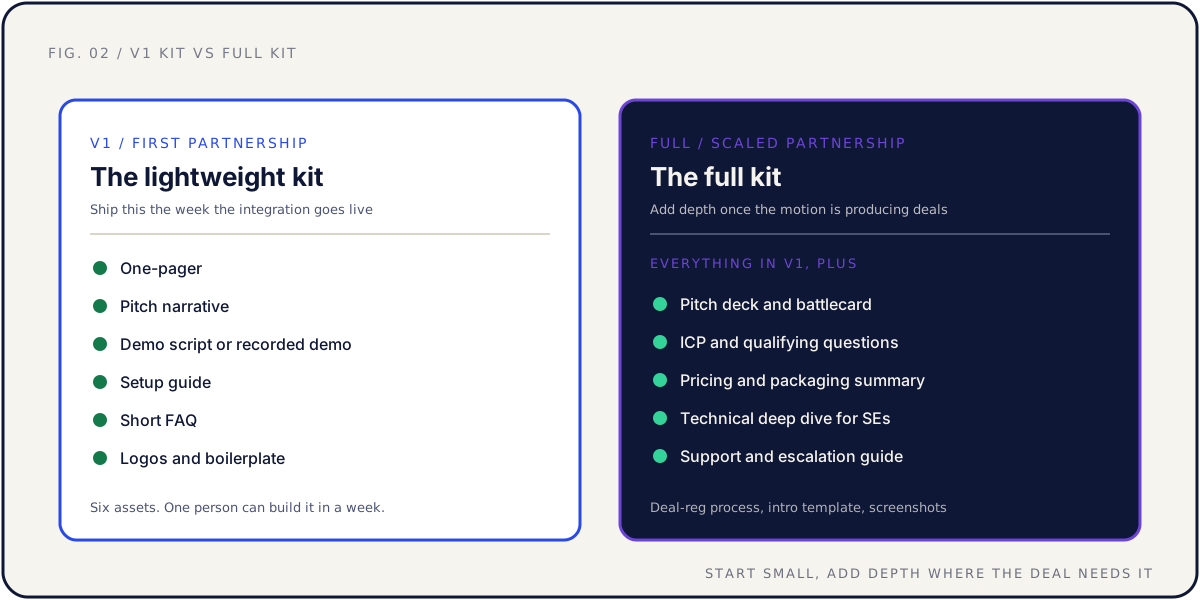
The v1 kit is six assets, and one person can build it in a week: a one-pager, a pitch narrative, a demo script or recorded demo, a setup guide, a short FAQ, and the co-marketing basics of logos and boilerplate. That is enough for a partner rep to recognize you, pitch you, demo you, and turn the integration on. It deliberately skips the depth, because depth you have not validated is depth you may have to throw away.
The full kit adds the layers that depth-buyers need: a pitch deck and battlecard, an ICP and qualifying questions, a pricing and packaging summary, a technical deep dive for solution engineers, a support and escalation guide, and the deal-registration process and intro template. You build these once the first partnership proves the joint value proposition is real and the motion is worth scaling.
| Kit version | When to build it | What it contains |
|---|---|---|
| V1, lightweight | The week the integration goes live | One-pager, pitch, demo, setup guide, FAQ, logos and boilerplate |
| Full, scaled | Once the motion produces deals | Everything in v1 plus deck, battlecard, ICP, pricing, SE deep dive, support guide, deal-reg |
The principle is the same one that governs the whole kit: tight beats comprehensive. Six assets a rep will actually open beat twenty that sit in a folder. Ship the v1, watch which assets reps actually use and which questions keep coming back, and let that usage tell you what to build next. The full kit you build from evidence is better than the full kit you guessed at.
The copyable kit checklist
Here is the checklist to lift into your own kit. Copy it, delete what does not apply, and ship it with your next partner. The v1 column marks what to build first; the full column marks what to add as the motion scales.
| Asset | Audience | V1 | Full |
|---|---|---|---|
| Partner one-pager | Sales | Yes | Yes |
| Pitch narrative | Sales | Yes | Yes |
| Pitch deck | Sales | Later | Yes |
| Demo script or recorded demo | Sales, SE | Yes | Yes |
| Battlecard | Sales | Later | Yes |
| ICP and qualifying questions | Sales | Later | Yes |
| Pricing and packaging summary | Sales, marketing | Later | Yes |
| Technical overview | SE, support | Yes | Yes |
| Integration setup guide | SE, support | Yes | Yes |
| FAQ | All | Yes (short) | Yes (full) |
| Technical deep dive | SE | Later | Yes |
| Support and escalation guide | Support | Later | Yes |
| Logos and brand usage | Marketing | Yes | Yes |
| Boilerplate copy | Marketing | Yes | Yes |
| Screenshots | Marketing | Later | Yes |
| Integration page link | Marketing, sales | Yes | Yes |
| Intro or deal-registration process | Sales | Later | Yes |
| Version stamp and changelog | Owner | Yes | Yes |
| Named kit owner | Owner | Yes | Yes |
Two notes on the checklist itself. Every kit needs a named owner and a version stamp, which is why both sit in the list. And the checklist is a starting point, not a finishing line: the assets that matter most are the ones your reps actually open, so revisit it once the kit has been in real hands for a quarter.
Common mistakes, and the fix
Promising a kit and never shipping it. The fix: ship the six-asset v1 the week the integration goes live, before it is perfect. A partner kickoff with a real kit attached beats a flawless kit that arrives three months late, by which point the partner has gone quiet.
Building only for the seller. The fix: organize the kit around all four roles and layer in technical, support, and marketing depth. A seller can open a deal, but a stumped solution engineer or a support ticket nobody can answer will lose it.
Scattering the kit across forwarded files. The fix: one versioned source of truth, every channel pointing at it, old copies retired to a marked archive. The PDF a rep downloaded in March is the enemy, because it is frozen at a moment that is now wrong.
Letting the kit go stale. The fix: tie kit updates to your release cadence and put the named owner on the release checklist. A change that breaks the demo or the pricing should update the kit in the same motion, not in a quarterly cleanup that never happens.
Building the full kit before you need it. The fix: ship the v1, watch what reps use and what buyers ask, then build the full kit from that evidence. Depth you have not validated is depth you may throw away.
FAQ
What is a partner enablement kit? It is the packaged set of assets a partner's team needs to pitch, sell, and support your product without you in the room. At a minimum it includes a one-pager, a pitch and demo, a technical overview and setup guide, an FAQ, and co-marketing basics. The kit is the artifact at the center of partner enablement, the thing every training and resource hub points back to.
How is this different from partner enablement in general? Partner enablement is the whole discipline: onboarding, training, certifying, and refreshing a partner's people. The kit is the deliverable they use. For the concept, the journey, and the channels, read partner enablement 101. This post is the deep dive on what goes in the kit and how to organize it.
What is the minimum kit for a first partnership? Six assets: a one-pager, a pitch narrative, a demo script or recorded demo, a setup guide, a short FAQ, and logos plus boilerplate. One person can build that in a week, and it is enough for a partner rep to recognize, pitch, demo, and turn on your integration. Add the deeper assets once the motion produces deals.
Who at the partner actually uses the kit? Four roles, with different depth. Sales pulls the one-pager, pitch, battlecard, ICP, and pricing. Solution engineers pull the technical overview, setup guide, demo, and deeper FAQ. Support pulls the FAQ, setup guide, and troubleshooting. Marketing pulls the logos, boilerplate, screenshots, and page link. Build one kit and layer in role-specific depth.
How do we keep the kit from going stale? Keep one versioned source of truth, give it a named owner, and tie updates to your release cadence so a change that breaks the demo or pricing updates the kit in the same motion. Version-stamp the kit, keep a short changelog, and retire old copies to a marked archive so nobody pitches a deprecated feature.
Where should the kit live? In one canonical, easy-to-find location that every channel points at rather than copies, such as a shared resource hub or a versioned folder. Group it by audience or asset type, name files predictably, and keep a top-level index so a new partner rep can self-serve on day one. The rule matters more than the tool: one source, no forwarded duplicates.
How does the kit connect to co-selling and co-marketing? The intro or deal-registration process and the field-ready sales assets are the on-ramp to a co-selling engine, which depends on partner sellers who can actually pitch you. The logos, boilerplate, and screenshots feed the SaaS co-marketing playbook. The kit is shared infrastructure both motions draw on.
Do we need a partnerships team to build the kit? No. At seed to Series B, a founder or product leader can build and own the kit if they treat it as a real deliverable with one owner and a version stamp. What you cannot do is leave it unowned. Kits rot not from missing headcount but from no single person keeping them current.
The short version
A partner enablement kit is the packaged set of assets a partner's team needs to pitch, sell, and support your product on their own. It ships with every new partnership, because a partner with no kit goes quiet, and the silence looks like an early-stage relationship when it is really a stalled one.
Build the full contents around three audiences: a one-pager, pitch, demo, and battlecard for sales; a technical overview, setup guide, and FAQ for solution engineers and support; and logos, boilerplate, and screenshots for marketing, plus the pricing summary, ICP, and intro process that tie it together. Organize it as one versioned source of truth with a named owner. Map the assets to the roles that use them. Keep it current by tying updates to your release cadence. And start with a six-asset v1, then build the full kit from what reps actually use. The copyable checklist above is yours to fork.
If you want the whole path handled, from partner strategy and a partner-ready API through the shipped integration, the enablement kit, and the co-sell motion on top, that is exactly what a Partner Audit is for. We review your product, API, and partner potential, then define what to build, who to approach, and how to ship and sell it together.