How to design an API sandbox partners can evaluate in minutes
How to design an API sandbox partners can evaluate fast: self-serve keys, seeded data, isolation, parity, and reset, with a requirements checklist.
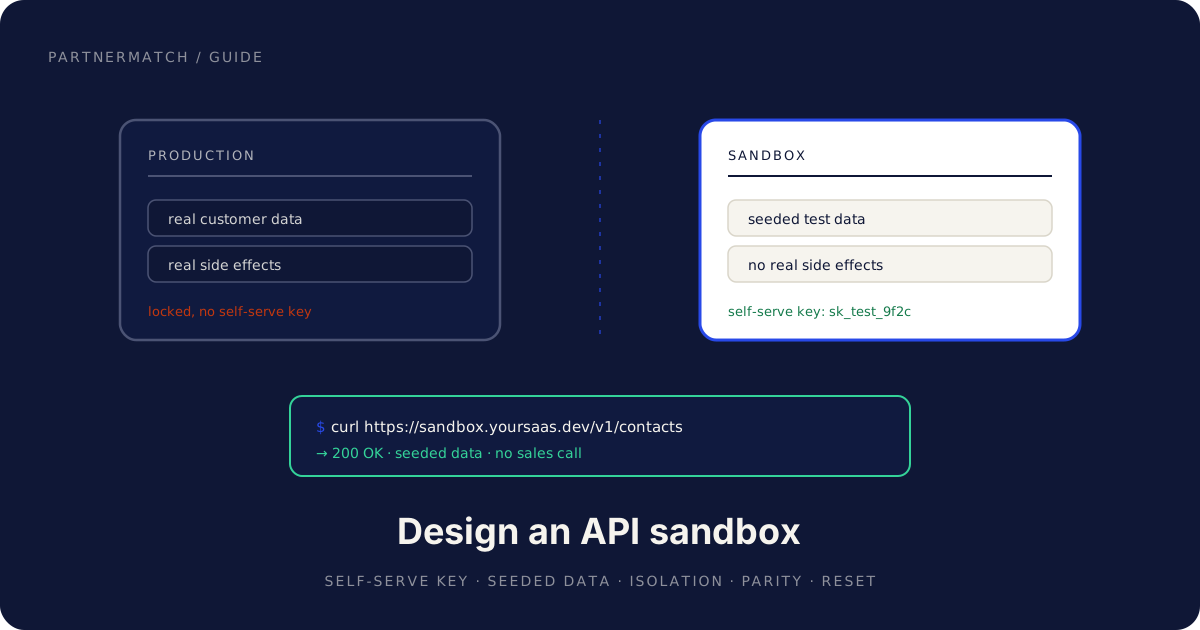
A partner engineer is sizing up your integration on a Thursday afternoon. They have two other vendors in the same tab group and a manager who wants an estimate by Friday. They are not going to book a sales call to find out whether your API can do the job. They are going to look for your API sandbox, make one real call, and see what comes back.
If they can, your odds went up. If they cannot, you became the integration they will "circle back to," which is where partnerships go to die quietly.
An API sandbox is the single highest-leverage thing you can build for partner evaluation. It is the difference between a partner who tests your API and a partner who tests your claims about your API. A partner engineer who can make a real call without talking to anyone says yes faster, scopes more accurately, and starts building sooner.
This guide is a practical reference for designing that sandbox: what an API sandbox is, the requirements that make one worth shipping, how to design test data that holds up under inspection, how it pairs with your docs and CLI, how to simulate webhooks, and how to measure whether any of it works. It pairs with our guide to making your API partner-ready, which covers the wider surface of auth, docs, and rate limits.
The 60-second version
- An API sandbox is an isolated, self-serve environment where a partner engineer can make real calls against seeded data with no risk to production.
- It is the highest-leverage asset for partner evaluation because it turns "trust us" into "see for yourself," and verification is what partnerships move at the speed of.
- A good sandbox has five properties: a self-serve test key, realistic seeded data, isolation with no real side effects, parity with production, and generous limits with an easy reset.
- Test data is a design problem, not a dump. Seed representative records and the edge cases that break naive integrations, and never copy real customer data.
- The sandbox pairs with a quickstart, good docs, and a CLI so the path from signup to first call is a few minutes, not an afternoon.
- Webhooks belong in the sandbox too. Let partners simulate events and receive them, or they cannot test the half of the integration that keeps data in sync.
- The pitfalls are predictable: a sandbox that drifts from production, one gated behind sales, or one with no data in it.
- Measure time to first sandbox call. It is the most honest single number about how your API feels to a partner.
What an API sandbox is, and why it is the highest-leverage asset
An API sandbox is a working copy of your API that a partner engineer can use without your help and without consequences. Same endpoints, same authentication, same responses, but pointed at isolated test data where nothing they do touches a real customer, sends a real email, or charges a real card.
The reason it matters so much is structural. Every other thing a partner asks during evaluation forces them to take your word for something: a use-case page says the integration is possible, a roadmap says the missing piece is coming. The sandbox is the one asset where the partner stops taking your word and checks for themselves.
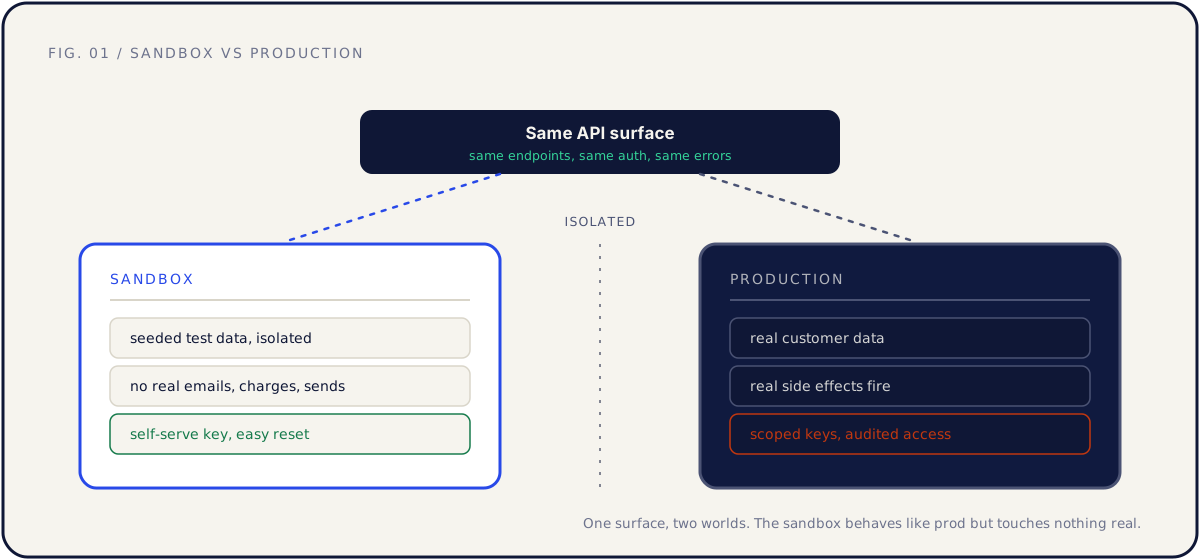
Think about what a partner engineer is really doing when they evaluate you. They are estimating risk, and risk is uncertainty with a deadline attached. An API they cannot try is pure uncertainty, so they pad the estimate and flag the integration as a maybe. An API they can call in two minutes collapses that uncertainty into a known quantity, and known quantities get scoped, scheduled, and shipped.
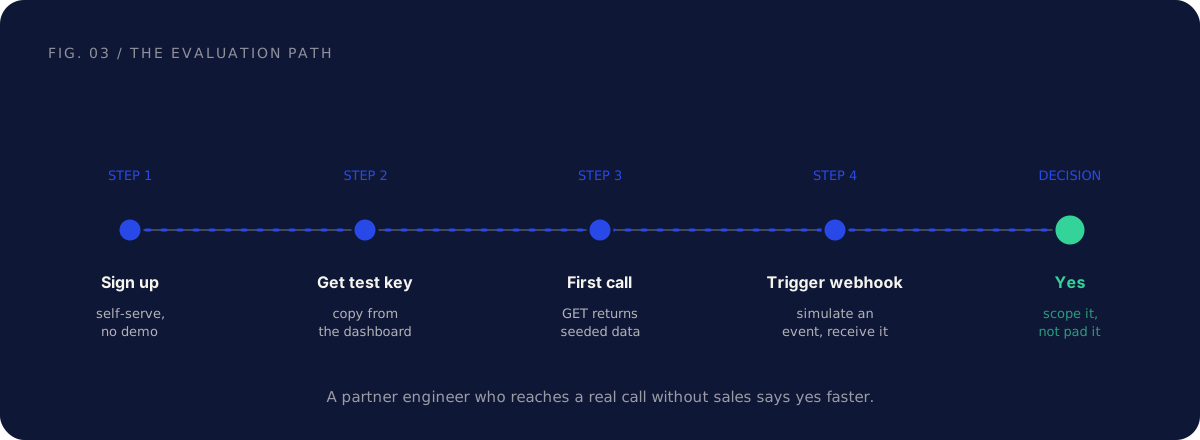
This is why a sandbox is worth more than another page of marketing or another feature. It moves the conversation from feasibility to scoping, which is the conversation you actually want to be in. The same logic runs through the partner-ready API guide: partnerships move at the speed of verification, and the sandbox is verification you can hold in your hands.
There is a second reason it pays off at seed to Series B specifically. A young company has less brand trust to lend the partner's risk assessment, so a sandbox is the cheapest credibility a small team can buy.
The requirements of a good API sandbox
A sandbox that exists is not the same as a sandbox that works for evaluation. Plenty of teams ship an environment they call a sandbox that a partner engineer abandons in four minutes, because they cannot get a key, there is no data, or the responses do not match the docs. Five properties separate a sandbox a partner can evaluate from one they cannot.
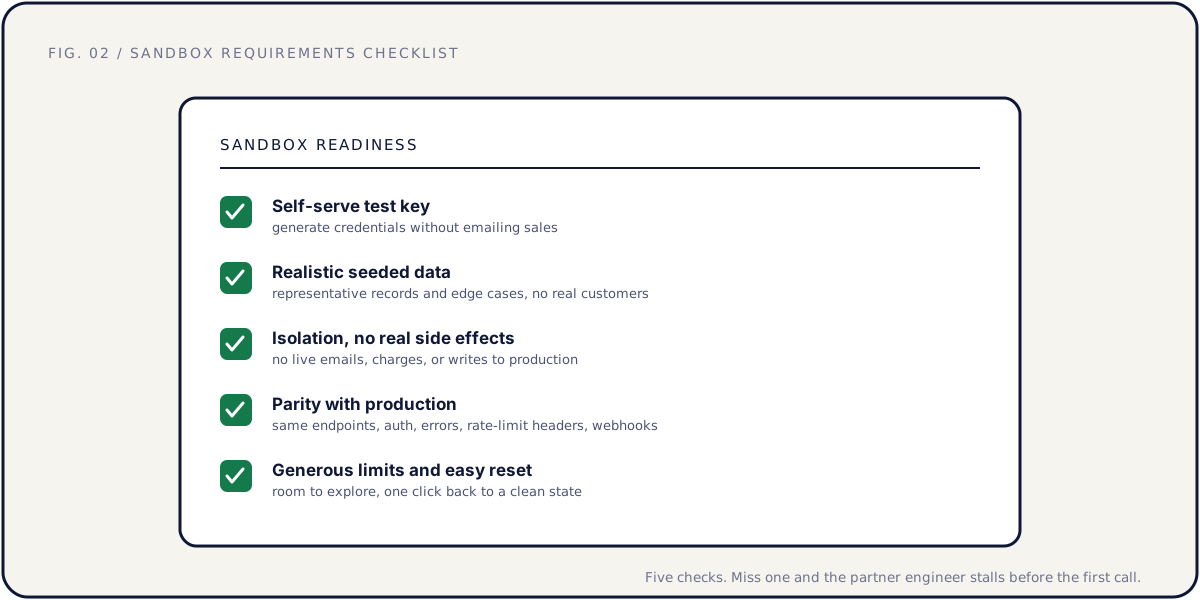
| Requirement | What it means | What fails without it |
|---|---|---|
| Self-serve test key | Generate credentials from a dashboard, no email | The evaluator leaves before they authenticate |
| Realistic seeded data | Pre-loaded with believable records and edge cases | An empty sandbox tests nothing, so it proves nothing |
| Isolation, no side effects | No live emails, charges, or writes leak to production | Engineers test only reads, never writes |
| Parity with production | Same endpoints, auth, errors, headers, webhooks | Integration bugs surface at launch, not evaluation |
| Generous limits, easy reset | Room to explore, one action back to clean | A throttled or polluted sandbox gets abandoned |
A few of these deserve a closer look, because the way teams get them wrong is consistent.
Self-serve test key. The whole point of a sandbox is removing humans from the evaluation loop, and a "request sandbox access" form puts the human right back in. The engineer who would have made a call at 4 PM now waits a day for provisioning, and by then their attention has moved on. The key should be visible in the dashboard the moment they sign up, clearly marked as a test key.
Isolation with no real side effects. This is the property that lets a partner engineer test the scary half of your API. Reads are safe to try anywhere. Writes are not, unless the engineer is certain that creating a contact will not email a real person and triggering a payment will not move real money. In the sandbox, every side effect is simulated or swallowed: emails go to a log, charges hit a test processor, exports write nowhere real. Say so explicitly, because the engineer will not call your write endpoints until they believe it.
Parity with production. A sandbox that diverges from production is worse than no sandbox, because it teaches the partner the wrong thing. If the sandbox returns a flat object and production returns a paginated envelope, the partner builds against the wrong shape and finds out during launch week. Parity means the same endpoints, auth flow, error bodies, rate-limit headers, and webhook payloads. The sandbox should differ from production in exactly one way: the data it points at.
Generous limits and easy reset. Evaluation is messy. Give the sandbox limits roomy enough that normal exploration never trips them, and a reset that returns the seed data to its original state in one action. A sandbox the partner can wreck and cannot restore is one they stop trusting.
Designing test data the sandbox seeds
An empty sandbox is a checkbox, not a tool. The most common reason a sandbox fails evaluation is not that it is missing, it is that it is barren. A partner engineer logs in, calls GET /v1/contacts, gets "data": [], and has learned nothing except that they have to invent data before they can test anything.
Seed data is a design problem. The goal is a dataset that lets a partner build and demo a real integration without creating a record first.
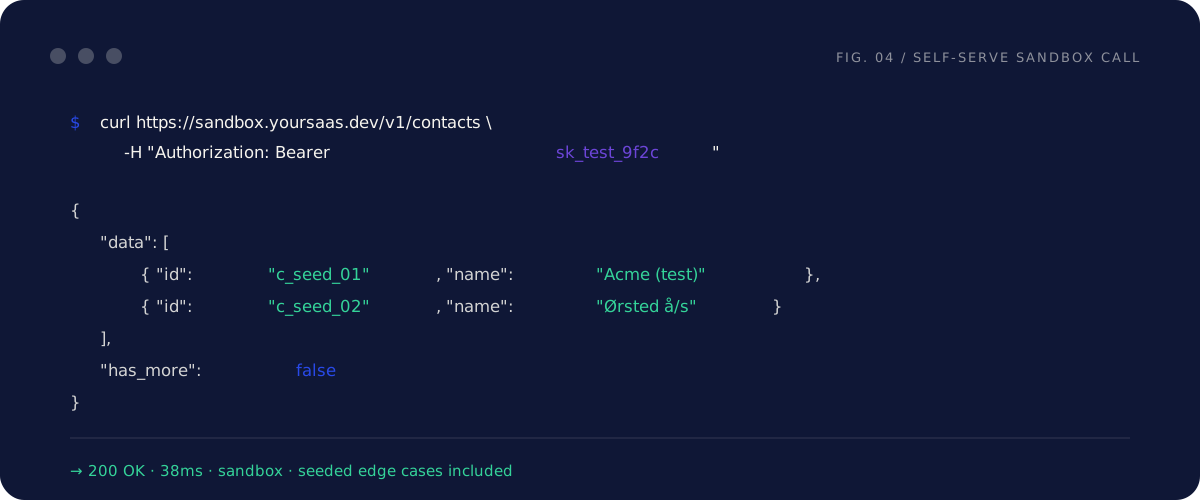
Three principles make seed data useful instead of decorative.
Representative records. Seed the objects a real customer would have, in believable quantities and relationships. A CRM sandbox should have a few hundred contacts across some companies, with the deals, notes, and owners that connect them. The partner should be able to look at the data and say "this is what our customers' accounts look like," because that is what tells them the integration is worth building.
Edge cases that break naive code. This is where good seed data earns its keep. Real data is ugly, and an integration that only handles clean data fails in production. Seed the ugly cases on purpose so the partner finds them during evaluation, not after launch:
| Edge case to seed | Why it matters |
|---|---|
| Unicode and accented names | Catches encoding bugs before real customers abroad do |
| Empty and null optional fields | Forces handling of missing data, not assuming it |
| Very long strings near field limits | Surfaces truncation and layout bugs early |
| Records with many related objects | Tests pagination and the N+1 query trap |
| A soft-deleted or archived record | Confirms the partner respects your lifecycle states |
| Multiple time zones and old timestamps | Catches date handling that only works for "now, here" |
No real customer data, ever. The seed dataset is synthetic, generated, and clearly fake. Copying production data into a self-serve environment turns a developer-experience win into a privacy incident. Generate the names and label test records so they are unmistakable. "Acme (test)" is a feature, not sloppiness.
One practical move: keep the seed dataset in version control as a fixture, and reload it on reset. That makes the data reproducible, reviewable, and easy to extend the next time a real integration teaches you about an edge case.
How the sandbox pairs with docs, a quickstart, and a CLI
A sandbox is necessary but not sufficient. A partner engineer also needs to know what to call, how to authenticate, and what a good first call looks like. The sandbox supplies the environment, and three other assets supply the path through it.
Docs and a quickstart turn the sandbox into a guided first call. The sandbox is where the call happens, but the quickstart is what gets the engineer there. The quickstart should target the sandbox by default, hand the reader a copy-pasteable request, and end in a 200 OK against seeded data. If it points at production and assumes the reader already has a key, you have made the sandbox optional, and optional sandboxes do not get used. Our API documentation best practices guide covers quickstart structure in depth; the quickstart and the sandbox are two halves of the same first impression.
A CLI makes the sandbox callable in one line. Nothing proves an API is real faster than a tool a partner engineer can install and run against the sandbox in two minutes. A CLI that reads a test key from an environment variable and prints seeded data lets the engineer skip the curl boilerplate and get to "it works" sooner. We make the full case in why your B2B SaaS needs a CLI, and the sandbox is what gives that CLI something safe to talk to.
Read together, the four assets form one funnel: the docs explain the model, the quickstart hands over a working call, the CLI removes the friction of making it, and the sandbox is the safe place where the call returns something real. Drop any one and the funnel leaks.
| Asset | Job in the first ten minutes | Without it |
|---|---|---|
| Docs | Explain the objects and auth model | The engineer cannot tell what to call |
| Quickstart | A copy-pasteable path to a first call | They start from a blank terminal |
| CLI | Make the first call a single command | Every test is curl boilerplate |
| Sandbox | A safe, seeded place to run the call | The call has nowhere real to go |
Simulating webhooks and events in the sandbox
Reads are the easy half of an integration. The half that keeps two systems in sync is events, and events are where most sandboxes stop being useful. A partner can list your contacts in the sandbox all day, but if they cannot make a webhook fire, they cannot test the part of the integration that matters most.
A webhook-capable sandbox needs two things a read-only sandbox does not.
A way to register a webhook endpoint. The partner needs to point your sandbox at a URL they control, usually a local tunnel, and confirm your system can reach it. This is also where they verify your signature scheme, so the sandbox must sign deliveries the same way production does.
A way to trigger events on demand. In production, events fire when real things happen. The partner cannot wait for a real customer to update a record, so you give them a trigger. A "send test event" button, or better, a sandbox endpoint that simulates an event, lets the partner fire a contact.updated payload and watch it arrive. The payload must be a real, complete example, not a stub, because the partner builds their handler against exactly what they receive here.
There is a subtle parity requirement hiding in webhooks. The sandbox should mirror production's delivery behavior, including retries and the failure path. If production retries failed deliveries on a backoff, let a partner test that by returning a non-200 on purpose and watching the retries arrive. An integration tested only against successful deliveries breaks the first time a partner's endpoint has a bad minute in production.
Common mistakes, and the fix
A sandbox that drifts from production. The most expensive failure, because it actively misleads. A sandbox built once and never updated diverges as production gains fields, changes error shapes, and adds endpoints, and the partner ships against a production that no longer matches. The fix: point the sandbox at the same code path as production, differing only in the data store, so parity is the default.
A sandbox you can only reach through sales. A form or a booked call to get sandbox access rebuilds the gate the sandbox existed to remove, and the engineer evaluating you between other tasks will not wait for provisioning. The fix: self-serve test keys, visible in the dashboard the moment someone signs up.
A sandbox with no data in it. An empty sandbox proves the endpoint exists and nothing else. The partner cannot demo, test pagination, or see what a real response looks like. The fix: seed it with representative records and deliberate edge cases, kept as a versioned fixture and reloaded on reset.
A sandbox that only handles the happy path. If the sandbox never returns a 422, never rate-limits, and never fails a webhook delivery, the partner tests only the easy half and gets surprised by the hard half in production. The fix: let the sandbox produce the same errors and failures production can.
Treating the sandbox as done once it ships. A sandbox is a product surface, and product surfaces decay without an owner. The fix: give it a named owner, the person who owns the API, and add a parity check to your release process so new production fields show up in the sandbox too.
FAQ
What is an API sandbox? An API sandbox is an isolated, self-serve environment that behaves like your production API but runs against seeded test data, so a partner engineer can make real calls without risking real customers, emails, or charges. It exists so a partner can evaluate your API by using it, not by trusting your description of it.
Why is a sandbox the highest-leverage thing for partner evaluation? Because it is the one asset that lets a partner verify your claims instead of trusting them. The pitch, the docs, and the roadmap all ask the partner to take your word for something. A sandbox lets a skeptical engineer prove the integration is feasible in a few minutes, which is what turns a maybe into a scoped project.
How is a sandbox different from production with a test account? A test account in production still touches real systems: a write can email a real person or hit a real ledger. A true sandbox isolates all side effects, so the partner can call write endpoints and trigger events without fear. The trade-off is parity, which is why the sandbox should share production's code path and differ only in its data.
What test data should a sandbox include? Representative records in believable quantities and relationships, plus the edge cases that break naive integrations: Unicode names, null optional fields, very long strings, heavily related objects, archived records, and awkward time zones. Always synthetic, never copied from real customers, and clearly labeled as test data.
Should the sandbox support webhooks? Yes. Webhooks are how integrations stay in sync, so a sandbox that cannot fire events lets partners test only the read half of your API. Provide a way to register a webhook endpoint and a way to trigger events on demand, with real signed payloads and the same retry behavior production uses.
How do I keep the sandbox in parity with production? Run the sandbox on the same code as production, switching only the data store, so new fields and changed behaviors appear in both automatically. Then add a parity check to your release process and give the sandbox a named owner, because parity erodes the moment nobody is responsible for it.
How do I measure whether the sandbox is working? Track time to first sandbox call: the minutes from signup to a successful response against seeded data, measured with a stopwatch on a clean machine. It is the most honest single number about how your API feels to a partner, and every place an evaluator stalls is a fix in priority order.
Further reading
- Stripe test mode — a widely cited example of a self-serve, well-seeded API sandbox.
- OAuth 2.0 — the standard for handling authentication cleanly across sandbox and production.
The short version
A partner engineer decides whether your integration is worth their time in the first few minutes they spend with your API, and they decide it by trying to make a real call. An API sandbox is what lets them. It is the highest-leverage asset you can build for partner evaluation because it turns your claims into something the partner can verify, and verification is what moves a partnership from maybe to scoped.
Build it with the five properties that matter: a self-serve test key, realistic seeded data with deliberate edge cases, isolation so no real side effects fire, parity with production down to the error bodies and webhook payloads, and generous limits with an easy reset. Pair it with a quickstart, clean docs, and a CLI so the path to a first call is short. Let partners simulate webhooks, not just read data. Then measure time to first sandbox call and treat every stall as a bug.
If you want an outside pair of eyes on exactly that, a Partner Audit reviews your API, sandbox, and docs, then hands you a concrete plan: what to build, what to seed, and which partners to approach once an engineer can reach a first call without talking to anyone.