How to write API documentation developers don't hate
API documentation best practices for B2B SaaS: the structure, quickstart, reference, and error docs that get a partner engineer to a first call fast.
A partner engineer opens your API documentation at 9 PM, the night before they have to give their manager an integration estimate. They are not reading your homepage copy. They are not watching your demo. They have one tab open, a terminal in the other, and about ten minutes of patience. What happens in those ten minutes decides whether your integration ships this quarter or slides to "someday."
This is the uncomfortable truth about API documentation best practices: your docs are the real first impression, not your sales deck. For anyone building on your API, the docs are the product. A founder can give a flawless pitch and still lose the deal three days later because the docs were thin, the quickstart did not work, or the error responses were a mystery. You never see that moment. You just feel the conversation cool.
The good news is that great docs are not a writing project so much as an engineering and product project with prose attached. This guide walks through the structure, the quickstart, the reference entries, the error docs, and the operating model that keeps all of it honest. It pairs with our guide to making your API partner-ready, which covers the wider surface of auth, sandbox, and webhooks.
The 60-second version
- Docs are the first impression for every partner and integrator, and the impression forms in about ten minutes.
- Information architecture comes first: overview, auth, quickstart, guides by use case, full reference, errors, changelog. In that reading order.
- The quickstart's only job is getting a developer to one successful call fast, with copy-pasteable steps that end in proof.
- Every reference entry answers what, how, and why, and ships a runnable example. A description without an example is a guess.
- Document errors so integrators self-serve. Cause plus fix for every code turns a support ticket into a thirty-second read.
- Keep docs in sync by generating from the spec and giving them a named owner. Orphaned docs decay one release at a time.
- Measure docs like a product: time to first call, support tickets, and the search terms that return nothing.
Why API documentation is the real first impression
Marketing controls the homepage. Sales controls the demo. Nobody controls the moment a partner's engineer opens your docs, and that is the moment that decides the integration. By the time anyone technical is reading your docs, the business conversation has already happened. Now an engineer is checking whether the claims survive contact with a terminal.
This is why API documentation best practices are a revenue topic, not a content-team topic. The partner engineer is writing an internal memo whether you like it or not. It says one of two things: "docs are clear, estimate is low" or "docs are thin, estimate is high, flag the risk." You do not get to read that memo. You only see its consequences in the roadmap priority your integration gets.
Two things make this audience different from your own engineers. First, they have no context. They do not know what a "workspace" means in your product or why a contact has two ID fields. Second, they have no patience to acquire that context, because they are evaluating three integrations this week and yours is one of them. Docs written for people who already understand your product fail this reader completely.
There is also a newer reader to design for. AI agents and coding assistants now read docs to figure out how to call APIs on a developer's behalf, and they are even less forgiving of ambiguity than people. The same clarity that helps a human helps an agent, which is part of why a scriptable surface like a CLI pays off, covered in why your B2B SaaS needs a CLI.
API documentation best practices start with structure
Most bad docs are not badly written. They are badly ordered. The endpoints are all there, alphabetized, accurate, and useless to a newcomer who needs to know where to start. Structure leads this list because it determines whether anything else gets read.
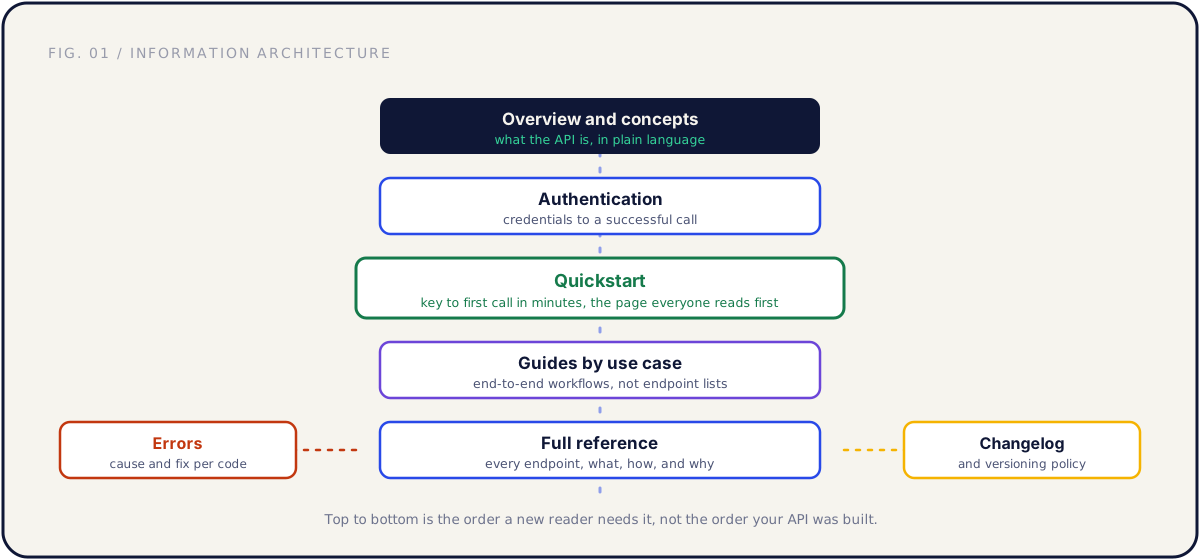
Order your docs the way a new reader needs them, not the way your API was built:
| Section | Answers the question | Reader's stage |
|---|---|---|
| Overview and concepts | What is this API, what does it model | First 60 seconds |
| Authentication | How do I prove who I am | Before any call |
| Quickstart | How do I get one call working now | First 10 minutes |
| Guides by use case | How do I build the thing I came for | Day one to week one |
| Full reference | What exactly does this endpoint do | Throughout the build |
| Errors | Why did my call fail and how do I fix it | Throughout the build |
| Changelog and versioning | Will this break on me later | Before committing, then forever |
The overview names the core objects and what they represent in the real world, in plain language, for someone who has never seen your product. If your overview opens with pagination conventions, you have buried the lede.
Authentication is the first code anyone writes against your API, so it is your real first impression in code. It needs a complete worked example, from credentials to a successful response, not just "we support OAuth 2.0." We go deep on auth choices in the partner-ready API guide.
The quickstart, guides, reference, and errors each get their own section below. The changelog comes last in the docs but matters early in the decision: a dated changelog tells a partner you treat the API as a product they can safely build on for years.
The quickstart that gets a developer to a successful call
The quickstart is the single highest-leverage page in your docs, and it has exactly one job: get a developer to one successful API call as fast as possible. Not a tour of features. Not a concepts lecture. One call that returns a real response, so the reader's first experience of your API is "it works."
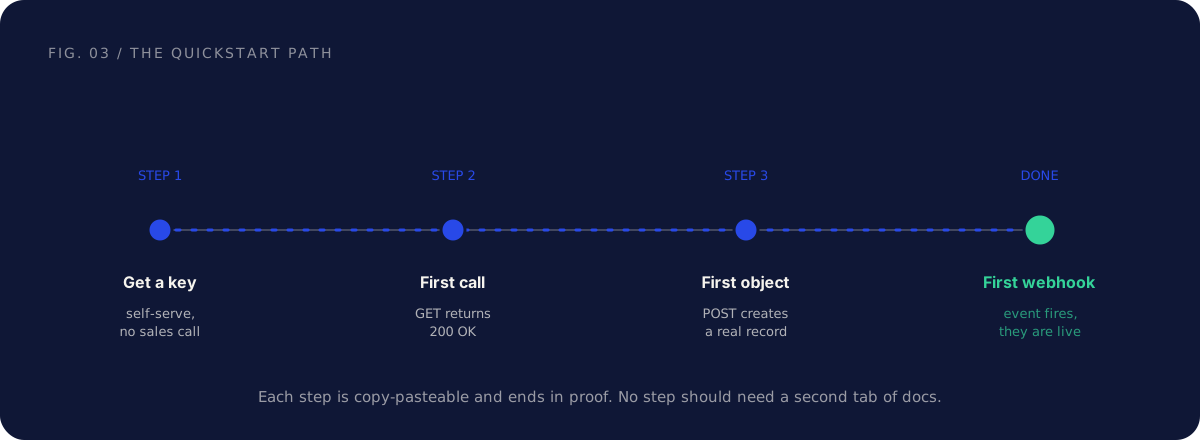
A quickstart that works follows four moves, and each one ends in proof:
- Get a key. Self-serve, no sales call, no "request access" form. The engineer evaluating you at 9 PM will not email anyone.
- First call. A single copy-pasteable request, usually a
GET, that returns200 OK. This is the moment that earns trust. - First object. A
POSTthat creates a real record they can see, so they know writes work, not just reads. - First webhook. An event fires and they receive it, which proves the integration can stay in sync.
Every step should be copy-pasteable and self-contained. The reader should never have to open a second tab of docs to complete a quickstart step. If step two requires reading the auth concepts page, the quickstart has failed, because you have re-introduced the friction the quickstart existed to remove.
The benchmark to beat is time to first call: signup to a successful response in under five minutes, measured with a stopwatch on a clean machine with none of your internal tooling installed. Every minute past five is a minute the reader spends deciding you are harder to work with than the alternative on their list.
A note on what to leave out. The quickstart is not the place for every parameter, every edge case, or every auth mode. It is the place for the single happy path that proves the API is real. Everything else has a home in the reference and the guides. Resist the urge to make the quickstart complete. Make it fast.
Writing reference entries developers trust
The reference is where your readers live during the actual build. A good reference entry answers three questions for every endpoint: what does this do, how do I call it, and why would I. Most reference docs answer only the first, badly, and skip the example that would have answered all three.
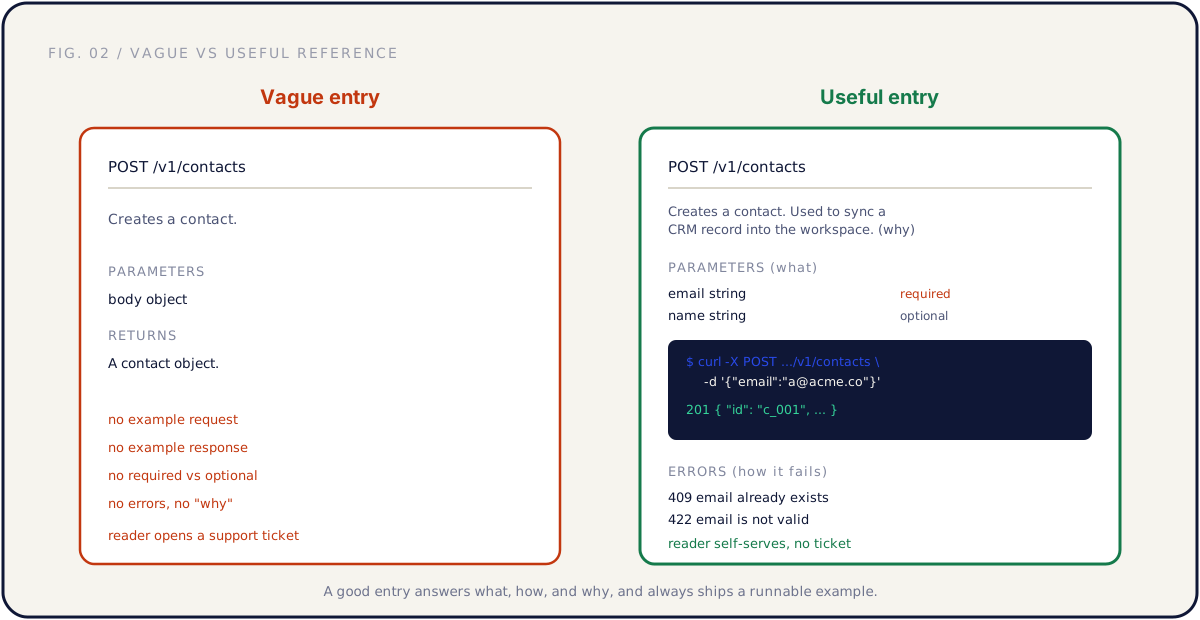
Here is the difference between an entry that creates support tickets and one that prevents them:
| Element | Vague entry | Useful entry |
|---|---|---|
| Description | "Creates a contact." | What it does and when you would use it |
| Parameters | "body: object" | Each field typed, with required vs optional marked |
| Example request | None | A runnable curl or SDK snippet |
| Example response | None | The real JSON the call returns, including IDs |
| Errors | None | The codes this endpoint can return, linked to the error catalog |
| Why | None | One line of context: the use case this serves |
The non-negotiable element is the working example. A description tells the reader what you intend; an example shows them what actually comes back. When the two disagree, and they will, the example is what saves the reader an afternoon. Show a real request and a real response, with realistic values, not string and 123.
Mark required versus optional parameters explicitly, and say what happens when a required field is missing. "email is required" plus "returns 422 if absent" is two sentences that prevent a dozen tickets. The why line is the one most teams skip and the one that turns a reference into something a reader can reason about: "Used to sync a CRM record into the workspace" tells them whether this is the endpoint they actually want.
Consistency across entries matters as much as the content of any one. Same field order, same example format, same way of marking required fields. A reference where every entry is shaped the same way teaches the reader to read it once and skim the rest.
Documenting errors so integrators can self-serve
Nobody integrates against the happy path. They integrate against the failures, because that is where the time goes. Error documentation is the most underrated of the API documentation best practices, and it is the one that most directly decides whether an integrator pings your support channel or fixes the problem in thirty seconds.
An error entry has three parts: what triggered it, what it means, and what the caller should do next. "400 Bad Request" with no body documentation is a debugging afternoon for your partner and a credibility hit for you. "400: the email field is missing or malformed, send a valid email address" is a fix.
| Status | Means | What the caller does |
|---|---|---|
| 401 | Missing or invalid credentials | Check the token, refresh if expired |
| 403 | Authenticated but lacks the scope | Request the write:contacts scope |
| 404 | The object ID does not exist | Verify the ID, check it was not deleted |
| 409 | Conflict, the record already exists | Fetch the existing record or update instead |
| 422 | Validation failed on a field | Read the field-level message, fix the input |
| 429 | Rate limit exceeded | Back off per the Retry-After header |
Two practices make error docs genuinely useful. First, return a machine-readable error body, not just a status code: a stable error code, a human message, and ideally the field that failed. Document that body shape once and the reader can branch on it in code. Second, document rate-limit responses as first-class errors, including the headers you return and the path to higher limits. Undocumented limits get discovered in the partner's production environment during their launch, which is the worst possible time.
The test for error docs is simple. Pick the five most common failures a new integrator will hit, almost always auth, a missing field, a bad ID, a duplicate, and a rate limit, and make sure each one has a cause and a fix written down. Those five cover most of the tickets you would otherwise field by hand.
Keeping docs in sync with the API
The fastest way to lose a reader's trust is one wrong example. The moment a copy-pasted snippet from your docs returns an error the docs do not mention, the reader stops trusting all of it and starts treating your documentation as fiction. Keeping docs in sync is therefore not hygiene, it is the thing that makes everything above worth writing.
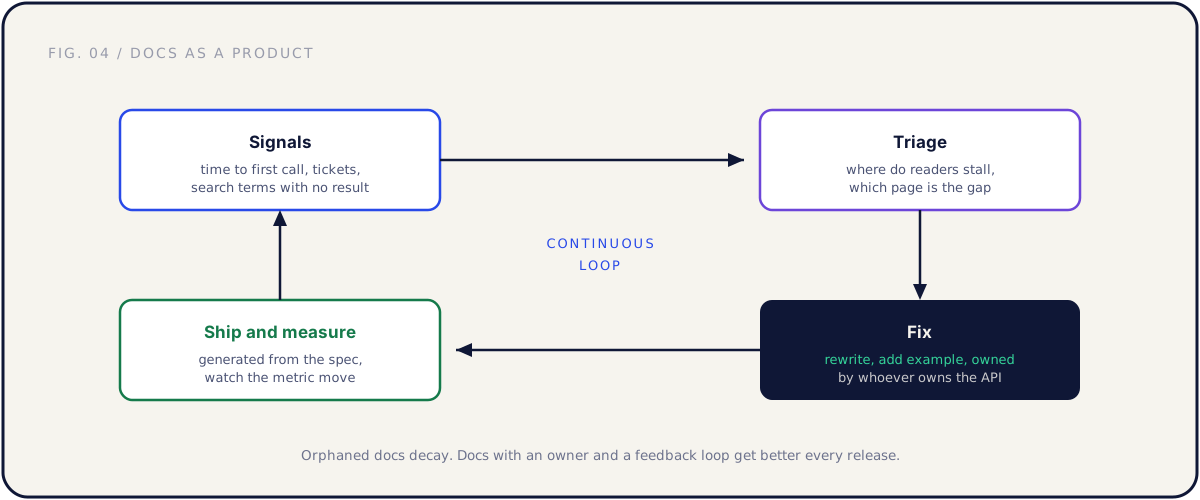
Three habits keep docs honest:
Generate the reference from the spec. If you maintain an OpenAPI spec, generate the reference section from it so endpoints, parameters, and types cannot drift from the real API. This also has a useful side effect: generating from the spec surfaces every place the spec was aspirational, because a wrong spec produces a visibly wrong doc. The same discipline powers generated SDKs and CLIs, covered in the CLI guide.
Test your examples. The quickstart and the worked examples should run in CI against a real environment. An example that is tested cannot rot silently. This is the single highest-return automation in a docs program, because the examples are exactly what readers copy.
Give docs an owner. Generated reference still needs hand-written overviews, guides, quickstarts, and error explanations, and those decay without a name attached. Docs owned by "everyone" are owned by no one. The owner is usually whoever owns the API, so behavior and its description ship together.
The mindset that ties these together is treating docs as a product with a feedback loop, not a launch artifact you write once. Usage signals and support tickets are bug reports against your docs. They tell you exactly which page failed, and a team that treats them that way gets better docs every release instead of slowly worse ones.
The ten-minute test a partner engineer runs
Everything above gets graded in one informal exam: the ten-minute test. When a partner gets serious, an engineer sits down with your docs and a terminal and tries to answer three questions before their patience runs out. You should run this test on your own docs, with a stopwatch, before any partner does.
| Minute | What the engineer is doing | What your docs need to deliver |
|---|---|---|
| 0 to 2 | Reading the overview, finding auth | A plain-language overview and an obvious auth page |
| 2 to 5 | Running the quickstart | A copy-pasteable path to a 200 OK |
| 5 to 8 | Mapping a use case to endpoints | Guides that match real workflows |
| 8 to 10 | Forming a verdict | No dead ends, no "contact us to continue" |
The way to run it honestly is to hand your docs homepage to an engineer who has never seen your product, ask them to reach a successful call while you watch in silence, and time it. Do not help. The silence is the point, because every place they stall is a place a real partner engineer will stall, except the real one will not tell you. They will just pad the estimate.
If they reach a successful call inside ten minutes and can describe a plausible integration, your docs pass. If they cannot, you have found your roadmap, in priority order, by watching exactly where they got stuck. This test is the cheapest docs research you will ever run, and it is the same lens we apply across the whole platform in our overview of tech partnerships for SaaS.
Measuring API documentation best practices in production
Docs feel subjective, so teams avoid measuring them and then argue about them based on vibes. They are more measurable than they look, and a few metrics turn the argument into a backlog.
| Metric | What it tells you | What a bad number looks like |
|---|---|---|
| Time to first call | How fast a new developer succeeds | Median over ten minutes |
| Support tickets per topic | Where the docs fail to self-serve | A spike on one endpoint or error |
| Docs search terms with no result | What readers expect that you do not have | "webhook signature" returning nothing |
| Quickstart completion rate | Whether the front door works | Drop-off before the first call |
Time to first call is the headline. It is the most honest single number about your developer experience, and it is the one a partner engineer feels directly. Measure it on a clean machine and treat any regression as a bug.
Support tickets are a heat map of your docs. Group tickets by the topic or endpoint they mention, and the clusters point at the pages that are failing. A ticket that begins with a pasted error message is telling you exactly which error doc to write next. Far from being a cost, those tickets are the cheapest user research you have.
Search terms that return nothing are a direct list of reader intent you are not serving. If people search your docs for "rate limit" or "webhook retry" and get nothing, you have both the missing page and its title handed to you. Review the no-result queries monthly and you will never run out of high-value pages to write.
Common mistakes, and the fix
Documenting for your own engineers and calling it partner docs. The fix: add the newcomer layer, a plain-language overview, a quickstart, and use-case guides. Hand the docs to an engineer who has never seen your product and watch where they stall.
A quickstart that is really a feature tour. The fix: cut it to the single happy path that ends in a successful call. If a step needs a second tab of docs to complete, fold that context into the step or remove the step.
Reference entries with no example. The fix: a runnable request and a real response on every entry, with realistic values. A description without an example is a guess the reader has to verify.
Treating errors as an afterthought. The fix: a cause and a fix for every status code, a machine-readable error body, and rate limits documented as first-class responses. Integrators live in the failure cases.
Writing docs once and walking away. The fix: generate the reference from the spec, test the examples in CI, give the docs an owner, and review tickets and search terms on a schedule. Orphaned docs are wrong docs with a delay.
FAQ
What are the most important API documentation best practices? Structure first: order the docs as overview, auth, quickstart, guides, reference, errors, changelog. Then a quickstart that reaches a successful call fast, reference entries with runnable examples, error docs with a cause and a fix per code, and an operating model that keeps everything in sync. Get those right and the rest is polish.
How long should a quickstart be? Short enough that a developer reaches a successful call in under five minutes. It should cover one happy path: get a key, make a call, create an object, optionally receive a webhook. If it is longer than a single screen of scrolling, it has probably turned into a feature tour and stopped being a quickstart.
Should we hand-write docs or generate them from our spec? Both. Generate the reference section from your OpenAPI spec so endpoints and types never drift, and hand-write the overview, quickstart, guides, and error explanations, which need judgment a generator cannot supply. Generating also surfaces the gaps where your spec was aspirational, which is worth the exercise on its own.
How do we document errors well? For each error, state what triggers it, what it means, and what the caller should do next. Return a machine-readable error body with a stable code and a human message, document rate-limit responses as first-class errors with their headers, and make sure the five most common failures, auth, missing field, bad ID, duplicate, and rate limit, each have a cause and a fix.
Who should own API documentation? One named owner, usually whoever owns the API, so the docs ship with the behavior they describe. Generated reference still needs a human to write and maintain the conceptual pages, and those decay fastest when ownership is diffuse. Docs owned by "everyone" drift out of sync within a release or two.
How do we measure whether our docs are good? Track time to first call as the headline number, group support tickets by topic to find the failing pages, review docs search terms that return nothing to find missing pages, and watch quickstart completion rate. Each one converts a subjective argument about docs quality into a specific item on a backlog.
How is this different from making our API partner-ready? Documentation is one surface of partner readiness. The full picture also includes authentication a partner can implement without a support thread, a self-serve sandbox with realistic data, and documented webhooks and rate limits. Our partner-ready API guide covers that whole surface, and a CLI adds a scriptable proof on top.
Further reading
- OpenAPI Initiative — the most widely used API description standard; generate reference docs straight from the spec.
- OpenAPI Generator — open-source tooling to generate client SDKs and docs from an OpenAPI document.
The short version
API documentation is the real first impression for everyone who builds on you, and the impression forms in about ten minutes. The API documentation best practices that matter most are not about prose. They are about structure, a quickstart that reaches a successful call fast, reference entries that answer what, how, and why with a runnable example, error docs that let integrators self-serve, and an operating model that keeps all of it in sync with the API.
Order the docs the way a newcomer reads them. Make the quickstart end in proof. Put a real example on every reference entry. Document the failures, not just the happy path. Generate from the spec, give the docs an owner, and measure them like the product they are.
If you want an outside pair of eyes on exactly that, a Partner Audit reviews your API, your docs, and your partner readiness, then hands you a concrete plan: what to fix, what to write, and which partners to approach once the docs can pass the ten-minute test.