HubSpot App Marketplace: a launch playbook for SaaS integrations
An independent HubSpot App Marketplace playbook for B2B SaaS. Decide if it fits, build the integration, meet listing requirements, get listed, and drive installs.
A customer asks, again, whether your product connects to their CRM. You know the answer should be yes. You also know that the HubSpot App Marketplace is where a lot of those customers go looking when they want a tool to plug into the CRM they already run every day.
This is an independent playbook for getting a B2B SaaS integration onto the HubSpot App Marketplace and turning the listing into installs and pipeline. It is educational, written from the outside, and it is not official HubSpot guidance. PartnerMatch is not affiliated with, endorsed by, or partnered with HubSpot. Wherever requirements come up, treat them as general categories and check HubSpot's current requirements before you scope anything.
What this guide covers: why the HubSpot App Marketplace is a strong distribution channel, how to decide if it fits your product, the general path to a live listing, what a listing that converts looks like, the app review and security expectations at a high level, how to drive installs into pipeline after launch, and how to maintain the listing as the platform evolves.
The 60-second version
- The HubSpot App Marketplace is a distribution channel, not a directory. A large base of CRM users shop it for tools that plug into the workflows they already run.
- It fits when your customers use HubSpot and the integration removes a real step. If neither is true, a listing will sit unused.
- The path is general and predictable. Build on the APIs, ship an OAuth install flow, meet listing requirements, submit for review, get listed, then aim for featured or certified status over time.
- The listing converts on the first line. Lead with the joined workflow, show a screenshot of both products together, add social proof and a real setup guide.
- App review checks security and behavior. Treat the requirements as acceptance criteria from day one and review is a formality, not a wall.
- Installs are not pipeline yet. Add attribution, in-app activation, and a review habit to turn a click into an opportunity.
- A listing is a maintained asset. HubSpot's platform evolves, so keep the integration, screenshots, and pricing current or the listing decays.
Why the HubSpot App Marketplace is a strong distribution channel
Most growth channels are rented. You pay for the click, the click stops when the spend stops. A marketplace listing behaves differently. Once it is live and ranking, it keeps generating installs while your team ships other features and sells other deals.
The HubSpot App Marketplace adds a specific advantage on top of that: intent. A buyer browsing it is already inside a CRM they pay for, running workflows they care about, and looking for a tool to fill a gap. That is a warmer starting point than a cold list. You are showing up inside a buying moment that has already started, not interrupting someone who was not thinking about you.
There is a credibility effect too. For a seed-stage product, being a listed app in a well-known ecosystem reads as enterprise-ready in a security review or a sales call. The listing does quiet trust-building work long after launch week.
This is the same compounding logic we cover in the SaaS marketplace strategy guide, applied to one specific ecosystem. The loop is the same: installs drive reviews, reviews drive ranking, ranking drives more installs, and co-marketing acts as a booster on top.
| Channel | How it behaves | What it costs to keep |
|---|---|---|
| Paid ads | Linear. Clicks stop when spend stops. | Continuous budget |
| Cold outbound | Linear. Pipeline tracks rep hours. | Continuous headcount |
| HubSpot App Marketplace listing | Compounding. Installs accrue and rank improves over time. | Quarterly maintenance |
The catch is that the loop only starts if the listing converts, and the listing only converts if the integration is real and the fit is right. So the first decision is not how to build it. It is whether to build it at all.
Deciding if the HubSpot App Marketplace fits
A listing is only worth the work if two things are true. Both questions are about your customers, not about HubSpot's size.
Do your customers use HubSpot? Look at your own base and your active pipeline. If a meaningful share of customers and deals run on HubSpot's CRM, the channel is pointed at people you already want. If almost none of them do, a listing is a logo in a directory that your real buyers never open. Pull the numbers before you commit engineering time.
What workflow does the integration remove? A marketplace listing earns installs by deleting a step from someone's day, not by existing. Write the value in one plain sentence from the customer's side. "When a rep closes a deal in our product, the contact and deal appear in the CRM within a minute, with no retyping." If you cannot write that sentence from real customer conversations, you are not ready to list. You are ready to run five customer interviews first.
These are the same two axes we use to choose any integration target, customer pull and distribution upside, described in the complete guide to tech partnerships. The marketplace listing and the integration are usually the same decision seen from two sides: you build the integration to earn the listing.
| Signal | Strong fit | Weak fit |
|---|---|---|
| Customer overlap | Many customers and deals run on HubSpot | Almost no overlap with your base |
| Workflow removed | One clear step deleted, stated in a sentence | A vague "better together" with no step removed |
| Data direction | Obvious owner for each record, clean sync | Unclear ownership, constant conflicts |
| Maintenance appetite | You can own updates as the platform evolves | No owner for the integration after launch |
If the fit is weak, the honest move is to not list, or to validate demand with a handful of named customers first. A neglected listing is worse than none. It collects one-star reviews from people the integration was never built for.
The path to getting listed, in general terms
Once the fit is clear, the path is predictable. The steps below are framed generally on purpose. HubSpot's exact mechanics change, so confirm the current process in HubSpot's developer documentation. The shape, though, is stable.
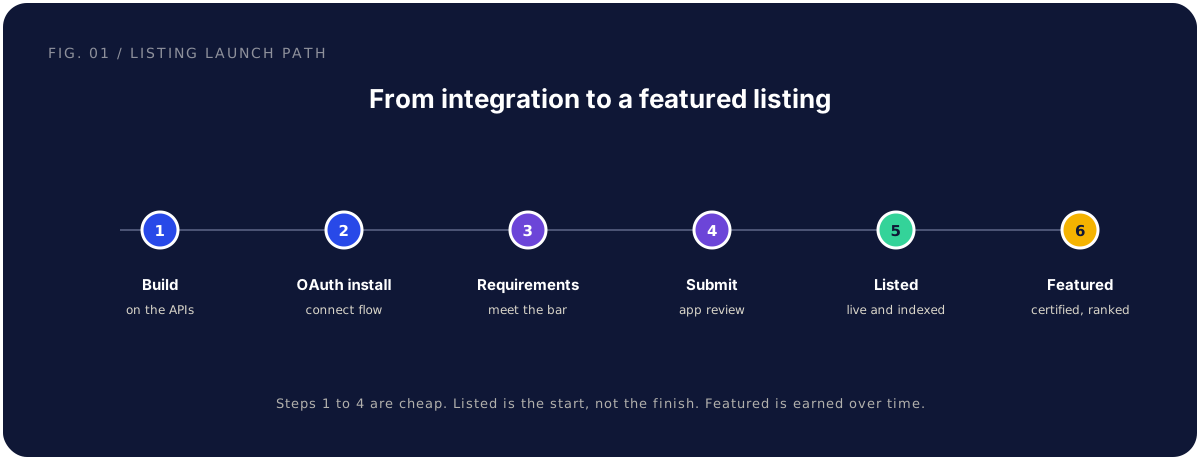
- Build on HubSpot's APIs. Implement the integration against HubSpot's public APIs for the objects and events your workflow needs, in a developer account.
- Ship an OAuth install flow. Public apps install through OAuth. A customer authorizes your app, you receive tokens, and you handle refresh and revocation. Request the minimum scopes the workflow needs and nothing more.
- Meet the listing requirements. Assemble what a public listing generally needs: a working install and uninstall, setup documentation, a support contact, a privacy policy, and the listing assets. More on this below.
- Submit for app review. You submit the app and listing for HubSpot's app review. Reviewers generally test that the app installs, behaves, and handles data the way the listing claims.
- Get listed. Once approved, the app is live and indexed in the marketplace, discoverable by HubSpot's users searching for tools.
- Aim for featured or certified status. Beyond a basic listing, ecosystems generally offer a higher tier that signals extra trust and review. Treat it as a goal you earn after the listing is live and converting, not a launch-day requirement.
Steps one through four are relatively cheap and fast. The expensive, easy-to-underestimate part is that "listed" is the start line, not the finish. Everything after it, conversion, installs, and maintenance, is where the channel is actually won.
A note on sequencing: build the integration before you chase the listing. The listing is the storefront for a working integration, and reviewers test the real thing. If your API and docs are not partner-ready, fix that first, because a listing on top of a fragile integration just converts shoppers into one-star reviews.
What a listing that converts looks like
A marketplace listing is a landing page whose layout you do not control. What you do control, the copy, the screenshots, the proof, and the setup path, decides whether a shopper installs or scrolls past.
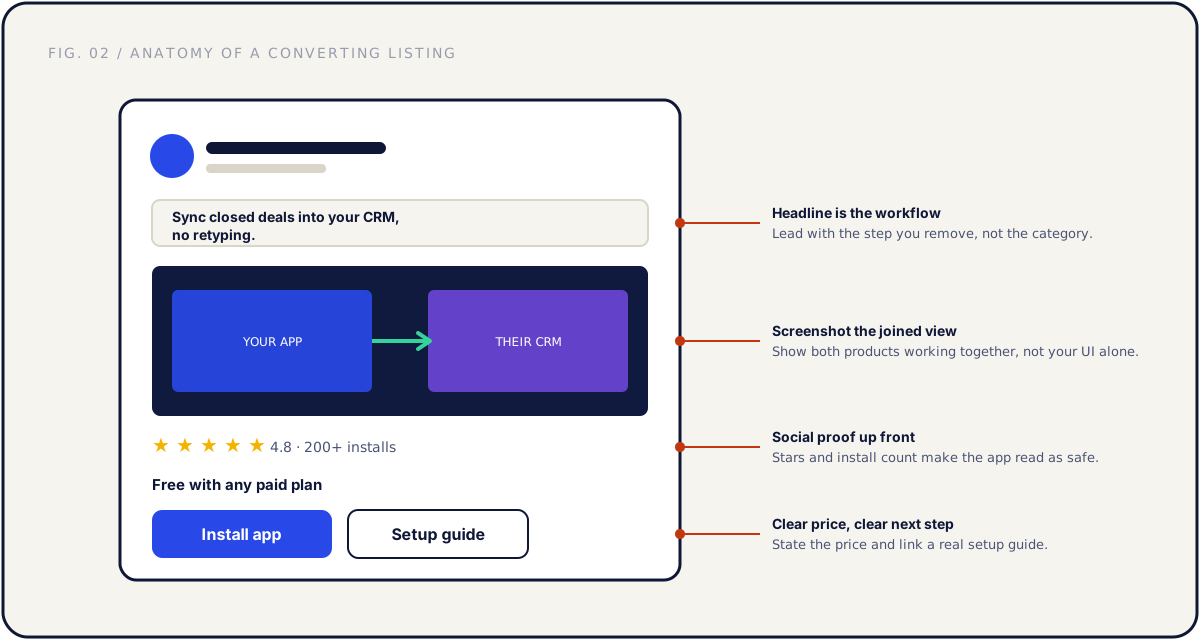
The first line is the workflow, not the category. The shopper is asking one question: will this remove a step from my day? Answer it immediately. "Push closed deals into the CRM without retyping a single contact" tells them what they get. "The leading revenue intelligence platform" tells them nothing they can act on.
Screenshots show the joined workflow. The most common mistake is showing your own product UI in isolation, or a wall of partner logos. The shopper wants to see the two products working together: data flowing from one into the other, the new record appearing inside the CRM they already use. Show the seam where the integration lives.
Social proof is stars and install counts. A listing with a strong rating and a visible install count reads as safe. A listing with no reviews reads as a gamble, however good the product is. This is why a review habit is part of the plan, not a nice-to-have.
A real setup guide and clear pricing close the gap. Shoppers self-serve their way to a decision. State the price plainly, "free with any paid plan" or a clear per-seat figure, and link a setup guide a customer can follow without booking a call. Ambiguity costs more installs than a price does.
| Listing element | Converts when | Loses the shopper when |
|---|---|---|
| Headline | Names the workflow you remove | Describes your category or funding |
| Screenshots | Show both products in one view | Show your UI alone or a logo wall |
| Social proof | Rating and install count visible | No reviews, no counts |
| Setup guide | Public, step by step, self-serve | "Contact us" with no real guide |
| Pricing | Stated plainly on the listing | Hidden behind a sales form |
Co-marketing is a strong booster on the listing, and a HubSpot listing pairs naturally with a joint launch. The mechanics of that are in the co-marketing playbook. Marketing the listing amplifies a listing that already converts. It cannot rescue one that does not.
App review and security expectations, at a high level
Every serious marketplace reviews apps before they go live, and HubSpot's app review is part of getting listed. The point of review is consistent across ecosystems: confirm the app installs cleanly, behaves the way the listing claims, and handles customer data responsibly. The specific criteria are HubSpot's and they change, so read their current requirements rather than treating any single list as final.
The reliable way to make review painless is to fold the requirements into your scope from day one, the same discipline that keeps any integration on track, described in the tech partnerships guide. When the checklist is the spec, review is a formality. When it is discovered at submission, review becomes a rework cycle.
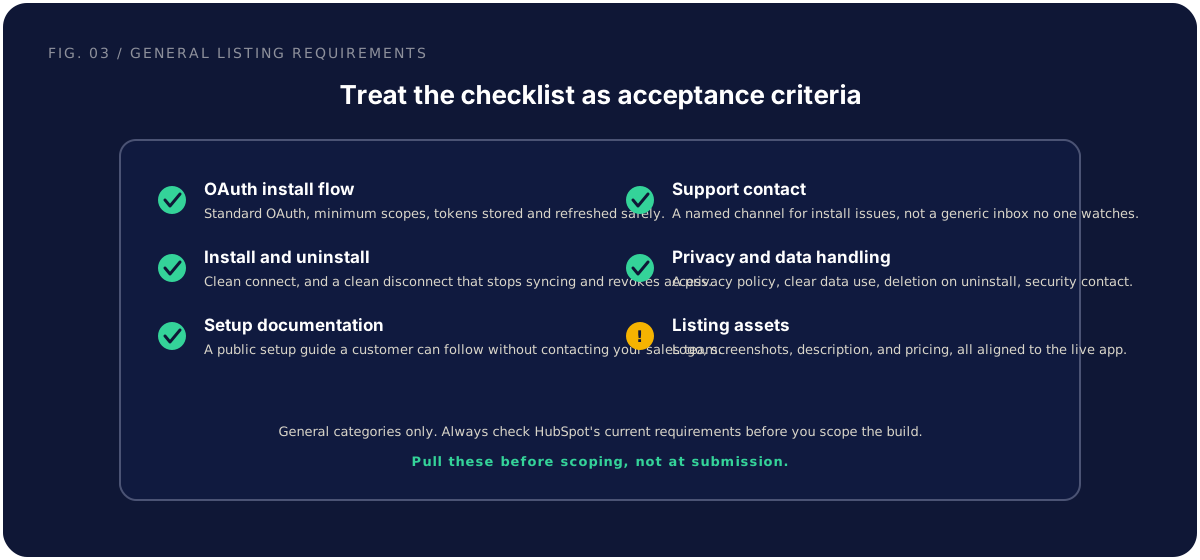
At a general level, expect review to care about these categories. None of these are exotic, and they are the same things a serious enterprise buyer asks about, so getting them ready pays off twice.
| Area | What reviewers generally look for | Have ready |
|---|---|---|
| OAuth and scopes | Standard install flow, minimum necessary scopes | Scope-by-scope justification |
| Token handling | Secure storage, refresh, and revocation | Auth lifecycle notes |
| Install and uninstall | Clean connect, and disconnect that stops syncing | Tested uninstall path |
| Data handling | How data is stored, used, and deleted | Privacy policy and deletion behavior |
| Reliability | App behaves as the listing describes | Error handling and rate-limit behavior |
| Support and contact | A reachable channel and a security contact | A named contact and a policy page |
A practical sequence that avoids the rework cycle: pull HubSpot's current requirements before scoping, write the integration scope with those items as acceptance criteria, self-audit against them before submitting, and treat any reviewer feedback as a bug list rather than a negotiation. Done this way, review tends to be measured in a reasonable window rather than dragging on. The teams who experience it as a slog are usually the ones who discovered the requirements at the end.
One guardrail worth repeating: do not invent the exact bar. We are describing general categories. The real criteria, fees, and timelines live in HubSpot's current developer and app review documentation, and they are what govern your submission.
Driving installs after launch and turning them into pipeline
Getting listed is not the win. An install is not revenue. It is a customer or prospect who clicked a button. Whether that click becomes pipeline depends on three things you build around the listing.
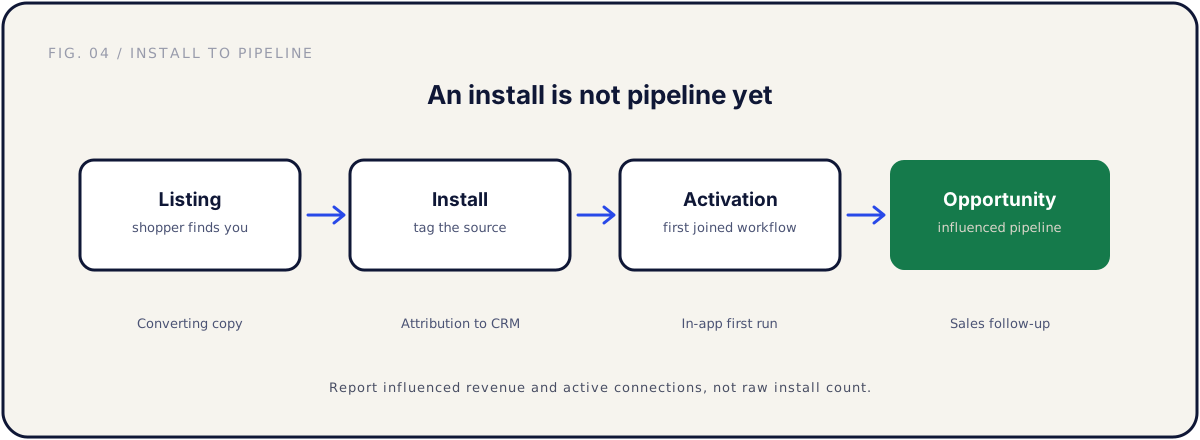
Attribution. You need to know which deals touched the marketplace and where installs came from. Tag installs with their source, pass that into your CRM, and report on influenced revenue and active connections, not raw install count. Without attribution, the channel is invisible in your reporting, which is how good channels get defunded by people who could not see them working.
In-app activation. The risky moment is right after install. A customer who connects and then cannot figure out the next step uninstalls within a week, which hurts both retention and your engagement signal. Design the first run deliberately: a setup that takes minutes, a clear first action, and a visible result. Get the customer to the joined workflow you promised in the listing's first line, fast.
A review habit. Reviews do not happen on their own. Happy customers rarely think to leave one; unhappy ones always do. After a customer has used the integration successfully for a couple of weeks, ask. A short in-app prompt or a one-line email at the right moment turns silent satisfied users into the social proof that ranks your listing and reassures the next shopper.
| Stage | The risk | What you do |
|---|---|---|
| Listing | Seen but not installed | Lead with the workflow, add proof |
| Install | Untracked, invisible in CRM | Tag the source, pass it to the CRM |
| Activation | Connected but never used | Fast first run, visible result |
| Opportunity | Use without sales follow-up | Surface active connections to sales |
There is also a direct outreach motion at launch. The customers who asked for the integration are your first installs and your first reviews. Reach them individually the week you go live. They turn a cold listing into one with proof, which is what every later shopper reacts to.
Maintaining the listing as HubSpot's platform evolves
A listing is a product, and products decay if no one owns them. HubSpot's platform changes: APIs get new versions, scopes shift, requirements get updated. Your own product changes too. A screenshot goes stale after a redesign, a pricing line goes wrong after a packaging change, an API version gets deprecated and your integration starts throwing errors that surface as one-star reviews before they reach your inbox.
The fix is a maintenance owner and a cadence. This is the same portfolio discipline from the marketplace strategy guide, applied to one listing you care about.
| Cadence | What to check |
|---|---|
| Quarterly | Screenshots current, copy accurate, pricing correct, new reviews answered |
| On product change | Update the listing the same week a UI or packaging change ships |
| On platform change | Test against new API versions, adjust scopes, ship the update |
| On deprecation | Migrate installed customers before the old version breaks, then update the listing |
The recency signal matters more than it looks. A maintained listing quietly outranks an abandoned one over time, and responding to reviews, including critical ones, signals to the marketplace and to future shoppers that the app is alive and supported. Deprecations deserve the most care: when a platform sunsets a version, you have installed customers depending on a connection that is about to break, and the job is to migrate them before the break, not after.
This is also the work that earns the higher tier. Featured or certified status is generally a function of a quality integration, a converting listing, real installs, and consistent maintenance, exactly the inputs this whole playbook is built around.
Common mistakes, and the fix
Listing when your customers are not on HubSpot. The fix: check the overlap in your base and pipeline first. If almost no one uses HubSpot, the listing is a logo in a place your buyers never visit. Validate demand before you build.
Writing the listing for yourself instead of the shopper. The fix: first line is the workflow you remove, screenshots show the joined view, pricing is explicit. Hand the listing to someone outside the company and watch where they get confused.
Discovering requirements at submission. The fix: pull HubSpot's current requirements before scoping and treat them as acceptance criteria. App review becomes a formality instead of a rework cycle.
Treating "listed" as the finish line. The fix: plan attribution, activation, and a review habit before launch. The channel is won after the listing goes live, not when it does.
Shipping the listing and never touching it again. The fix: a named maintenance owner and a quarterly refresh. A listing on a platform that evolves will decay without one, and decay shows up as bad reviews.
FAQ
Is the HubSpot App Marketplace worth it for a seed-stage startup? If a real share of your customers and deals run on HubSpot and the integration removes a clear step, yes. The listing is mostly a fixed cost up front that keeps generating installs after launch. If the overlap is thin, spend the effort where your customers actually are instead.
Do we need the integration built before we can list? Almost always, yes. The listing is the storefront for a working integration, and reviewers generally test the real app during review. Build it partner-ready first, then list. A listing in front of a fragile integration just converts shoppers into one-star reviews.
How long does HubSpot's app review take? That depends on HubSpot's current process and on how prepared you are, so check their documentation for timelines. In general, teams who fold the requirements into scope from the start move through faster than teams who discover them at submission. We are not stating an official timeline here.
What does the app review check? At a general level, that the app installs cleanly through OAuth, requests minimum scopes, handles tokens and uninstall correctly, manages customer data responsibly, and behaves the way the listing claims. The exact, current criteria are HubSpot's and you should read them directly rather than relying on any summary.
Should our integration be free or paid? For most B2B SaaS, free with a paid plan removes friction and maximizes installs, which feeds ranking. Charging directly is viable when the integration is a substantial standalone capability, but it raises the conversion bar. Whatever you choose, state the price plainly on the listing.
How do we get our first reviews and installs? Reach the customers who asked for the integration individually the week you launch. They are your warmest installs and your most likely reviewers. Then build an ongoing habit: prompt satisfied users a couple of weeks after they activate.
What is the difference between listed, featured, and certified? A basic listing means your app is live and discoverable. A higher tier, generally framed as featured or certified, signals extra trust and additional review. Treat it as something you earn after the listing is live and converting, and confirm the current tiers and criteria with HubSpot.
Can we run this without a partnerships hire? Yes. At seed to Series B this is usually owned by a founder or product leader, with engineering capacity for the build and maintenance. A dedicated hire makes sense once the channel is proven, not before. What you cannot skip is a named owner.
Further reading
- HubSpot developer documentation — official APIs, app development, and App Marketplace listing requirements. Always confirm current requirements here, since they change.
The short version
The HubSpot App Marketplace is a strong distribution channel when your customers actually use HubSpot and your integration removes a real step from their day. Decide that first, honestly, using your own base and pipeline.
If it fits, the path is predictable: build on the APIs, ship an OAuth install flow, meet the listing requirements, submit for review, get listed, then earn featured or certified status over time. Write a listing whose first line is the workflow, with a screenshot of the joined view, real social proof, and clear pricing. Treat app review requirements as acceptance criteria so review is a formality. Then turn installs into pipeline with attribution, activation, and a review habit, and maintain the listing as HubSpot's platform evolves.
Done this way, one listing keeps generating installs for years, and each turn of the loop makes the next one cheaper. This is independent guidance, not official HubSpot policy, so always confirm the current requirements before you submit.
If you want the whole path handled, from deciding whether the marketplace fits to building the integration to a listing that converts, that is exactly what a Partner Audit is for. We review your product, API, and marketplace potential, then define what to build, how to meet the listing bar, and how to ship a listing that compounds.