Auto-updating your CRM from call transcripts with AI
How to update a CRM from call transcripts with AI: extract stage, next step, blockers, and contacts, then write back through a human review gate.
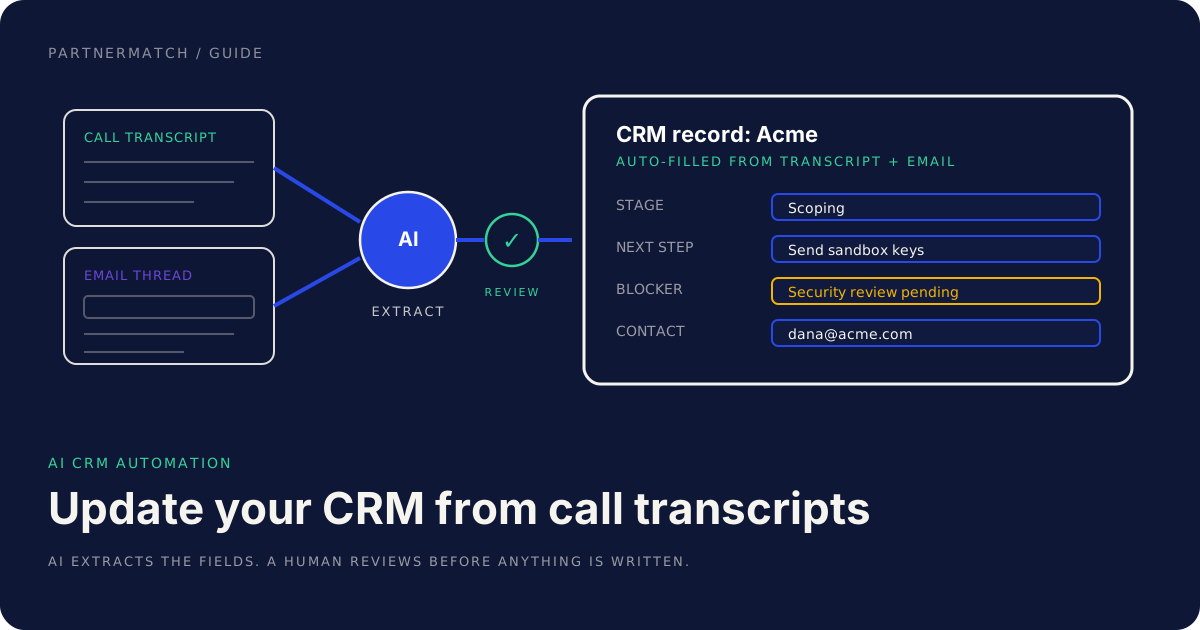
Every partnerships team and every sales team has the same quiet problem: the CRM is out of date, and everyone knows it. You can update a CRM from call transcripts with AI instead of relying on someone to remember, and that one change turns the system of record from a chore nobody does into something that stays current on its own. The record is supposed to be the source of truth, but the truth lives in the heads of busy operators who just finished a call and are already on the next one.
This guide is about AI CRM automation done in a way you can actually trust. The shape of the work is a good fit: a call produces a transcript, a deal produces an email thread, and both are full of structured facts trapped in unstructured language. Stage, next step, blocker, who is now the decision-maker. A human reading it would know exactly what to log. The problem was never knowing what to write; it was finding the ten minutes to write it.
What AI changes is the cost of that ten minutes. An assistant reads the transcript and the thread, extracts the fields, and proposes the updates. What it does not change is who owns the record. A person still reviews before anything is written, because a CRM that auto-fills itself with confident errors is worse than one that is merely stale.
This post covers why CRMs rot, the workflow to update a CRM from call transcripts with AI, exactly what to extract, how to design the human-in-the-loop, the build options, the privacy guardrails, and how to measure the win.
The 60-second version
If you only read one section, read this one:
- CRMs rot because updating them is manual work that busy operators skip. The data exists in transcripts and email threads; it just never gets transcribed into fields.
- The workflow is capture, extract, review, write. AI reads the transcript and the thread, proposes structured fields, a human approves, and only then does the CRM update.
- Extract a fixed set of fields: stage, next step and owner, blockers, key contacts and roles, commitments and dates, and sentiment. Each one carries a source quote.
- The review gate fails closed. If no human reviews the draft, nothing is written. The AI proposes; it never silently changes a record.
- Build options run from buy to build: an existing AI note-taker, your own extraction pipeline, or an MCP server that exposes the CRM to an assistant.
- Privacy guardrails are not optional: consent to record, PII handling, retention limits, and no unreviewed external sends.
- Measure the win in CRM freshness, hours saved, and forecast accuracy, not in how clever the extraction looks.
- A human still owns the relationship and the final record. AI CRM automation gives back the data-entry hours; it does not take over the account.
Why partner and sales CRMs rot
The CRM is the one artifact everyone agrees matters and nobody keeps current. Understanding why is the whole point, because the fix has to target the actual cause, not the symptom.
Updating it is manual, and the manual moment is the worst moment. The time to log a call is right after it, which is exactly when the operator is least able to. They are walking to the next meeting, and structured data entry is the last thing they will choose. So the note never gets written, or it gets written three days later from fading memory.
The inputs are unstructured and the CRM is structured. A call is forty minutes of conversation; an email thread is a fork of replies. The CRM wants a stage, a date, a picklist value. Converting one into the other is real cognitive work, and a tired human does it badly or not at all. This gap is precisely where AI CRM automation earns its place.
Nobody owns freshness as a job. Ask whose responsibility it is that the record is current and you get a shrug. It is everyone's, which means it is no one's. The rep thinks the manager checks it; the manager thinks the rep maintains it; the partnerships lead reconstructs it the night before a review.
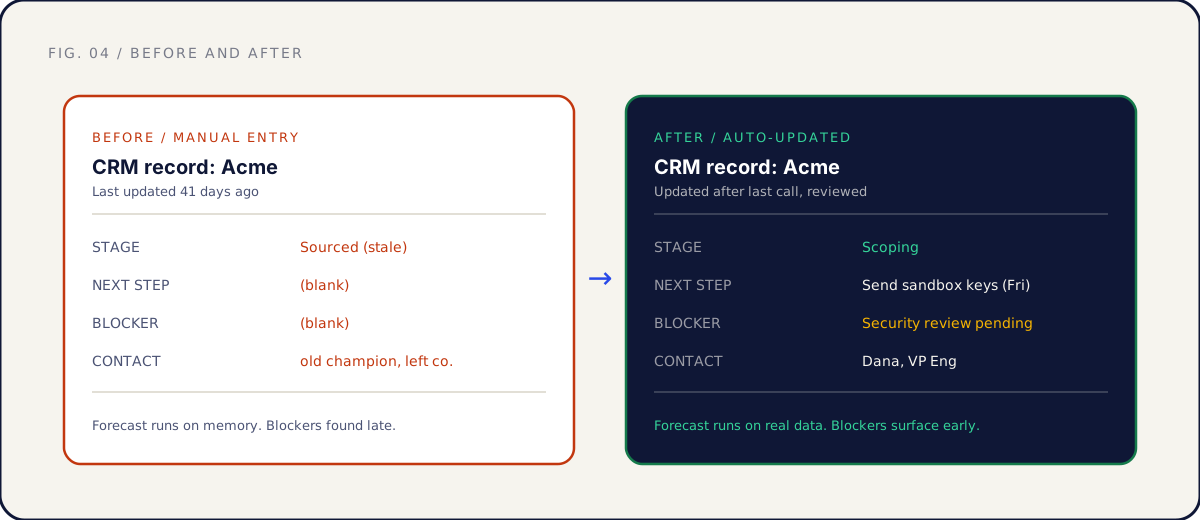
The cost is not abstract. A stale CRM produces a forecast built on memory, blockers found late when they are expensive to clear, and a quarterly review spent reconstructing what happened instead of deciding what to do next. For a partnerships team, a rotten partner CRM means the dashboard a founder looks at is fiction.
| Why the CRM rots | What it produces | What auto-updating changes |
|---|---|---|
| Logging is manual and badly timed | Records written from fading memory, or not at all | AI drafts the fields from the transcript while it is fresh |
| Inputs are unstructured, fields are structured | The conversion work gets skipped | AI does the messy-to-structured conversion |
| No one owns freshness | Everyone assumes someone else updates it | The pipeline keeps records current by default |
| Operators are always on the next call | The note that mattered never gets typed | The note is drafted automatically, reviewed in seconds |
The workflow to update a CRM from call transcripts with AI
The workflow that makes AI CRM automation safe has four steps, and the order matters. Capture the raw material, extract structured fields, review them, then write. Skip the review step and you have built a fast way to corrupt your system of record.
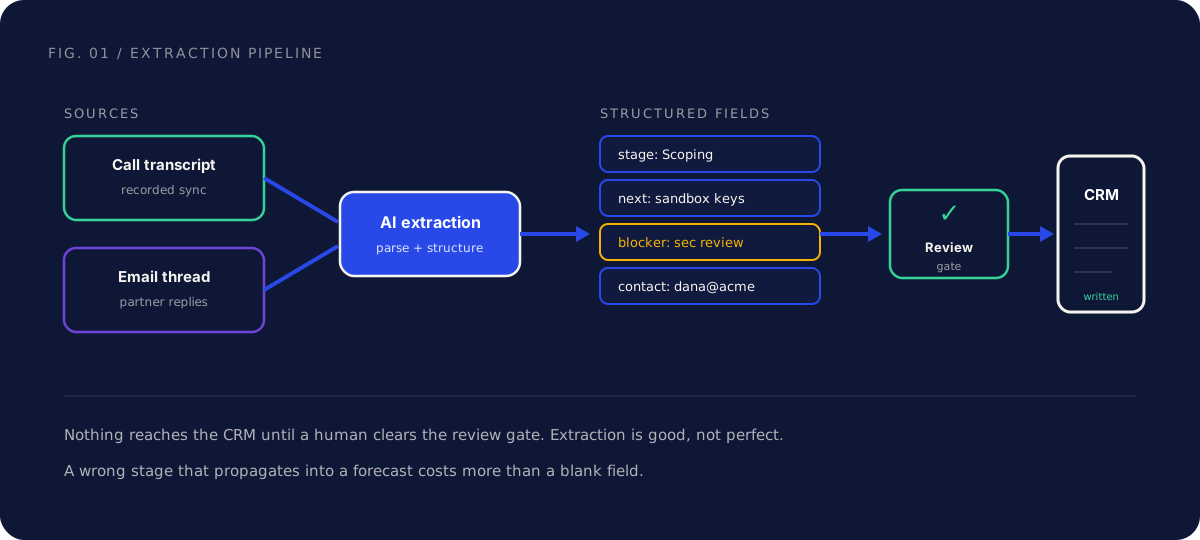
Step 1: Capture. The raw material is the call transcript and the related email thread. Transcription is a solved product; most call recorders produce a usable transcript automatically, and the email thread is already text. The only real decision here is consent to record, covered in the guardrails section, settled before any of this runs.
Step 2: Extract. The transcript and thread go to an AI assistant with a clear instruction: pull a fixed set of fields, and for each one, include the quote it came from. The source quote is the load-bearing detail, because it lets a reviewer check the quote against the field instead of re-reading the whole call.
Step 3: Review. A human looks at the proposed fields. Most are right and get approved in seconds, some need an edit, a few get rejected. This is the gate, and it is the difference between a tool you trust and one you turn off after it writes a wrong stage into a forecast.
Step 4: Write. Only the approved fields get written. The rejected ones leave the record untouched, which is the correct default: a blank field a human will fill later is safer than a confident wrong value the team now treats as true.
| Step | Input | Output | Who owns it |
|---|---|---|---|
| Capture | Call, email thread | Transcript and text | Recorder, with consent |
| Extract | Transcript and text | Proposed fields with source quotes | AI assistant |
| Review | Proposed fields | Approved, edited, or rejected fields | A human |
| Write | Approved fields | Updated CRM record | The pipeline, gated |
The whole loop takes the operator under a minute: glance at six proposed fields with their quotes, approve the right ones, fix the one that is off. The alternative is the ten minutes of structured data entry that, in practice, never happens. The point is not to remove the human, but to reduce the job from authoring to approving.
Exactly what to extract
Vague extraction produces vague records. The instruction to the AI should name a fixed set of fields, because a known schema is what makes the review fast and the data useful. Here is the set worth pulling from a partner or sales call.
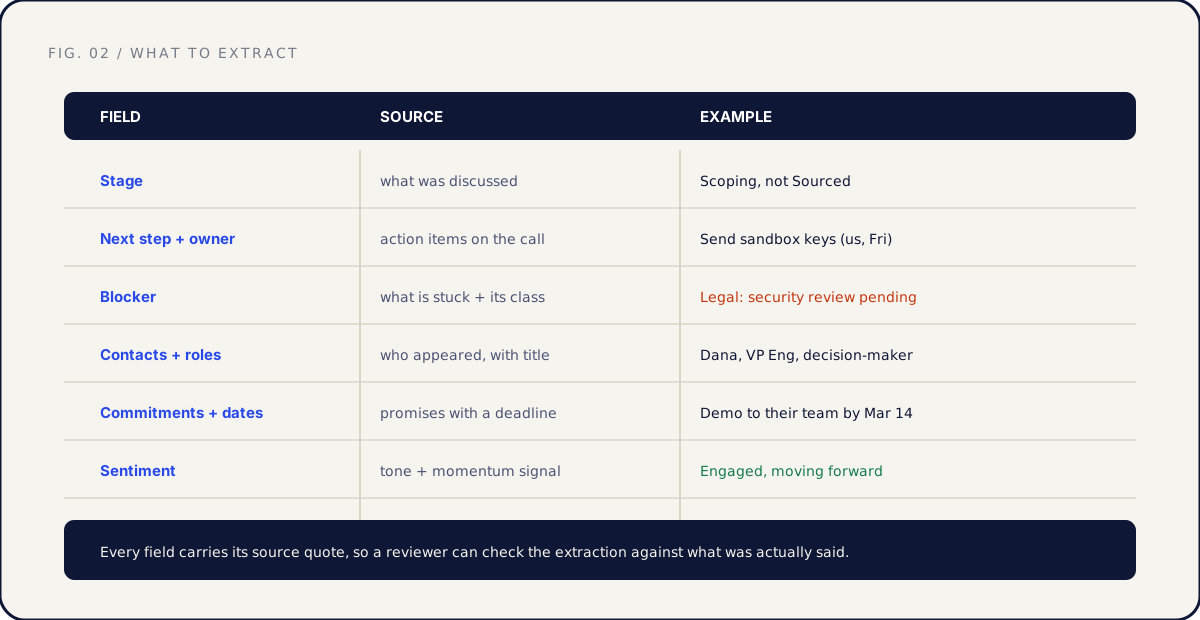
- Stage. Where the deal or partnership actually sits, inferred from what was discussed, not from someone remembering to move a card. "We are still scoping the integration" sets the stage to Scoping even if the record still says Sourced.
- Next step and owner. The concrete action and who holds it. "Send sandbox credentials by Friday, on us" is a next step. "Stay in touch" is not. The owner matters as much as the action, because an unowned next step is a next step that does not happen.
- Blockers. What is stuck, and which class it falls into. The same decision, dependency, access, and legal classes that drive every integration project apply here. A blocker logged with its class is a blocker someone can act on.
- Key contacts and roles. New people who appeared on the call or in the thread, with their role. "Dana, VP Engineering, the decision-maker on this" keeps the relationship map current so you are not emailing a champion who left three months ago.
- Commitments and dates. Promises made, by either side, with their deadlines. These are the things that get forgotten and then surface as broken trust. "We will demo to their team by March 14" belongs in the record, not in someone's memory.
- Sentiment. A read on tone and momentum: engaged, stalling, frustrated. This is the softest field and the one to treat with the most caution, because tone is easy to misread from text. Useful as a signal, never as a fact.
The discipline that makes all of this trustworthy is the source quote. Every extracted field comes with the exact line it was drawn from, so a reviewer reads six quotes and confirms the fields match instead of re-reading the call. The quote is also the audit trail: when a stage is questioned in a review, you can point to the sentence that set it.
| Field | What it captures | Confidence to assign |
|---|---|---|
| Stage | Where the deal actually sits | High when stated, flag when inferred |
| Next step and owner | The concrete action and who holds it | High; action items are usually explicit |
| Blockers | What is stuck, by class | High; usually said outright on the call |
| Contacts and roles | Who appeared, with title | High for names, flag inferred roles |
| Commitments and dates | Promises with deadlines | High; these are stated commitments |
| Sentiment | Tone and momentum | Low; treat as a signal, review hardest |
Designing the human-in-the-loop
The single design decision that separates safe AI CRM automation from a liability is the review gate, and specifically that it fails closed. The default state, when no human has acted, is that nothing gets written. The AI proposes; absent an approval, the record stays exactly as it was.
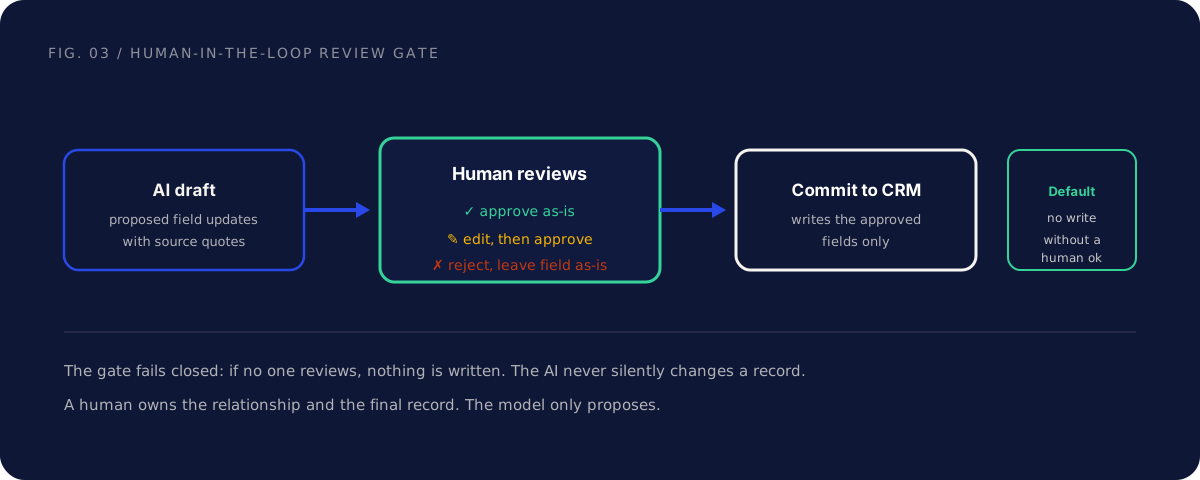
The reviewer has three moves, and all three are cheap:
Approve as-is. The proposed field matches the source quote and the reviewer agrees. One click. This is most fields most of the time, which is what makes the gate fast rather than burdensome.
Edit, then approve. The extraction is close but not quite. The stage should be Scoping, not Building; the date is the 14th, not the 4th. The reviewer corrects it and approves. The correction is itself a useful signal about where the extraction is weak.
Reject. The field is wrong or the AI invented something not in the source. The reviewer rejects it and the record stays unchanged. A rejected field is not a failure; it is the system working, catching the thing that would have corrupted the record.
Two choices make this gate strong rather than ceremonial. First, batch the review: do not interrupt the operator mid-call, queue the updates, and let them clear a batch when they sit down. A gate that demands attention at the wrong moment gets bypassed, and a bypassed gate is no gate. Second, never auto-commit the soft fields. Sentiment, inferred roles, and anything flagged as uncertain should always require an explicit approval, never a default-yes.
The reason this matters is the asymmetry of errors. A blank field costs you a little: someone fills it in later. A confident wrong field costs you a lot: it propagates into the forecast, the review, the partner update, and the team starts treating fiction as fact. The gate exists because those two errors are not equal. This is the same generous-reads, guarded-writes pattern that keeps any AI tooling safe: the model reads everything, but acting on the record stays human-gated.
Build options: note-taker, pipeline, or MCP server
There is no single right way to build this. The decision is the familiar build-versus-buy one: buy the generic, build the specific. Three options, in rough order of effort.
Option 1: An existing AI note-taker. Many call-recording and note-taking tools already extract action items and sync some fields to a CRM. If your stages are standard and your CRM is one they integrate with, this is the fastest path and probably the right one to start with. The limit is that you get their schema, not yours, and their idea of a "next step," not your six fields with source quotes.
Option 2: Your own extraction pipeline. When your fields are specific, your stages are non-standard, or you want the source-quote discipline the note-takers skip, you wire up your own. A transcript and thread go to an AI assistant with your exact schema, the structured output lands in a review queue, and approved fields write to the CRM through its API. More work, full control, and a maintenance commitment you own.
Option 3: An MCP server that exposes the CRM to an assistant. The most flexible option puts an interface in front of the CRM that an AI assistant can use directly: read the current record, propose an update, and write it back only through a gated tool. This is the pattern in our guide to building an MCP server so agents can use your product. The assistant reads the transcript, reads the existing record for context, and drafts the diff, while the write tool requires human confirmation. The same discipline decides which tools are read-only and which are gated writes.
| Option | Best when | Effort | Tradeoff |
|---|---|---|---|
| Existing AI note-taker | Standard stages, supported CRM | Low | Their schema, not yours |
| Your own pipeline | Specific fields, non-standard stages | Medium | You own the maintenance |
| MCP server to the CRM | You want an assistant working the record directly | Higher | Most flexible, most to design |
The honest advice mirrors the broader AI partner toolkit: start with the assistant before the platform. Before building anything, paste a transcript into a general assistant with your schema and see how good the extraction is. That test tells you whether the value is there and how much build is justified, often in an afternoon.
Whichever option you pick, the write path is the part that needs care, not the extraction. Extraction is increasingly a commodity. A gated, audited, reversible write to your system of record is the thing worth designing well.
Data and privacy guardrails
This is the section that keeps AI CRM automation from becoming a problem. The inputs are recordings of real conversations with real people, full of names, contact details, and things said in confidence. Speed without guardrails is how you end up explaining a data incident to a partner.
Consent to record. Before any of this runs, you need consent to record the call. Many jurisdictions require it, and beyond the legal question, a partner who discovers you transcribed a call they did not know was recorded is a partner you have lost. Settle consent at the start, make it standard, and do not improvise it per call.
PII handling. Transcripts are full of personal data. Decide on purpose what you retain, redact what you do not need, and check what your AI tooling does with the text. "We fed every partner call into a tool and never read its data policy" is a sentence you do not want to say in a security review.
Retention. A transcript is useful for extracting fields and rarely useful forever. Set a retention window, delete on schedule, and keep the structured fields, which are the durable value, rather than the raw recording. The less conversational data you hoard, the smaller your exposure if something goes wrong.
No unreviewed external sends. This is the corner most worth guarding. An assistant that can read a transcript and draft a follow-up email should never be wired to send it. The gap between draft and send is where a human catches the hallucinated commitment, the wrong recipient, the tone that lands badly. Internal writes get a review gate; external sends get the same gate, no exceptions.
| Guardrail | The risk it addresses | The practice |
|---|---|---|
| Consent to record | Legal exposure, lost trust | Standard consent, settled up front |
| PII handling | Personal data mishandled at scale | Redact, scope access, read the policy |
| Retention | Hoarded transcripts as liability | Retention window, keep fields not recordings |
| No unreviewed external sends | A bad message in a partner's inbox | AI drafts, a human sends, always |
The rule underneath all four is the one that governs the review gate: AI can read and draft freely, but acting on the world, writing the record, sending the email, stays human-gated. Generous reads, guarded writes. The privacy posture and the quality posture point at the same control.
Measuring the win
If you cannot measure it, you cannot defend the time you spent building it. Three metrics tell you whether AI CRM automation is working, and none of them is "the extraction looks impressive."
CRM freshness. Measure how recently records were updated, as a distribution across the portfolio. Before, the median record might be weeks stale; after, most records reflect the last interaction. This is the most direct measure, because freshness is the problem you set out to solve.
Hours saved. Estimate the data-entry time the team is no longer spending. If updating a record after a call took ten minutes and a review takes under one, the saved time compounds across every operator and every call. The honest version counts the reviews, because the review is the new work that replaces the old.
Forecast accuracy. The downstream payoff. When records are current, the forecast runs on real data instead of memory, blockers surface while they are still cheap to clear, and the weekly review spends its time deciding rather than reconstructing. This is the metric that justifies the project to a CEO, because it connects clean data to a number they already care about.
| Metric | Before auto-update | After auto-update |
|---|---|---|
| CRM freshness | Median record weeks stale | Most records reflect the last call |
| Hours saved | Ten minutes of entry, usually skipped | Under a minute of review per call |
| Forecast accuracy | Built on memory and guesswork | Built on current, reviewed data |
| Blocker latency | Found late, expensive to clear | Surfaced at the call, cheap to clear |
A caution on the hours-saved number: it is easy to inflate by counting data entry that was never happening anyway. The real win is not time recovered but data that now exists at all. A record that used to be blank is now current, and that is worth more than the minutes, even if the minutes were never truly spent.
Where this fits the bigger picture: auto-updating the CRM is one tool in a broader AI partner toolkit, alongside drafting collateral and mapping accounts, and it supports every stage of the SaaS partnership lifecycle by keeping the record of each relationship honest. The freshest CRM does not run a partnership. It makes sure the human running it is working from facts.
Common mistakes, and the fix
Auto-committing extracted fields without review. The fix: the gate fails closed, always. Nothing writes to the CRM without a human approval, even when the extraction is usually right. The day a confident wrong stage propagates into a forecast is the day the team stops trusting the tool, and trust does not come back cheap.
Extracting vague fields instead of a fixed schema. The fix: name the exact fields and require a source quote for each. "Pull the key points" produces a record nobody can review or act on. Stage, next step and owner, blocker, contacts, commitments, sentiment, each with its quote, produces a record someone can approve in seconds.
Skipping consent and privacy because it is just internal data. The fix: settle consent to record up front, decide retention on purpose, and read the data policy of any tool you feed transcripts into. It is not just internal data; it is recordings of other people's words. Treat them the way you would want a partner to treat a recording of you.
Wiring the assistant to send external messages. The fix: internal writes are gated, external sends are gated harder. An assistant that drafts a follow-up email is useful; one that sends it is a hallucinated commitment waiting to land in a partner's inbox. AI drafts, a human sends, every time.
Measuring cleverness instead of outcomes. The fix: track freshness, hours saved, and forecast accuracy. A demo where the AI extracts a perfect record proves nothing. A portfolio where the median record is current and the forecast is trusted proves the whole point.
FAQ
Will this replace the person who owns the account? No. It replaces the data entry that person keeps skipping, not the relationship they manage. The AI proposes fields; the human reviews them, owns the record, and owns the partner conversation. AI CRM automation gives back the ten minutes of typing per call. What the person does with the relationship is still entirely theirs.
How accurate is the extraction, really? Good, not perfect, which is exactly why the review gate exists. Explicit facts like action items, named contacts, and stated commitments extract reliably. Inferred fields like stage and especially sentiment need more scrutiny. The design assumes the extraction will sometimes be wrong and makes that cheap to catch, rather than pretending it will always be right.
Is it safe to put call transcripts into an AI tool? Only after you have decided what the tool does with the data. Get consent to record, check the tool's retention and training policy, redact the PII you do not need, and scope who can access the transcript. Transcripts contain names, contact details, and confidential remarks. The convenience never overrides the obligation to handle that responsibly.
Should the AI write to the CRM automatically? The extraction can run automatically; the write should not, without a human in the loop. The safe pattern is that the AI drafts the field updates and a person approves them before they commit. A CRM that auto-fills with unreviewed values is worse than a stale one, because the team treats the wrong values as true.
What is the fastest way to start? Paste a recent transcript into a general AI assistant with your six fields named, and see how good the extraction is. That afternoon test tells you whether the value is there before you build. From there, an existing note-taker is the lowest-effort production path; a custom pipeline or an MCP server is the higher-control one.
How is this different from what my call recorder already does? Many recorders extract action items and sync a few fields. The difference is schema and discipline. Your own pipeline pulls your exact fields, attaches a source quote to each for fast review, and routes everything through a gate that fails closed. If your stages are standard and the recorder's schema fits, start there; build when your workflow is genuinely specific.
What should it never do without a human? Two things: write a value it is uncertain about, and send anything external. Internal writes pass a review gate; external sends pass the same gate harder. The whole design rests on generous reads and guarded writes, where the AI can read and draft everything but acting on the record or the outside world stays human-gated.
The short version
CRMs rot because keeping them current is manual work that busy operators skip, and the data that should be in them is trapped in transcripts and email threads as unstructured language. You can update a CRM from call transcripts with AI by running a simple loop: capture the transcript and thread, extract a fixed set of fields with source quotes, review them, and write only what a human approved.
Extract stage, next step and owner, blockers, contacts and roles, commitments and dates, and sentiment, each carrying the quote it came from. Design the human-in-the-loop so the gate fails closed: nothing gets written without an approval, the soft fields always need an explicit yes, and the default is no change. Buy the generic note-taker, build the specific pipeline, or expose the CRM to an assistant through an MCP server. Handle consent, PII, and retention on purpose, and never let the assistant send external messages unreviewed. Measure freshness, hours saved, and forecast accuracy.
The line that does not move: AI CRM automation gives back the data-entry hours, but a human still owns the relationship and the final record. The model fills in the form. The person decides what the record means and what to do next.
If you want help deciding where AI fits your partner operations, and how to keep your partner record honest without scaling headcount, that is exactly what a Partner Audit is for. We review your product, API, and partner potential, then define what to build, who to approach, and how to ship it.