Using AI to scale a partnerships team without scaling headcount
How AI partner tooling helps small teams: drafting collateral, auto-updating the CRM from transcripts, mapping accounts, and shipping integrations faster.
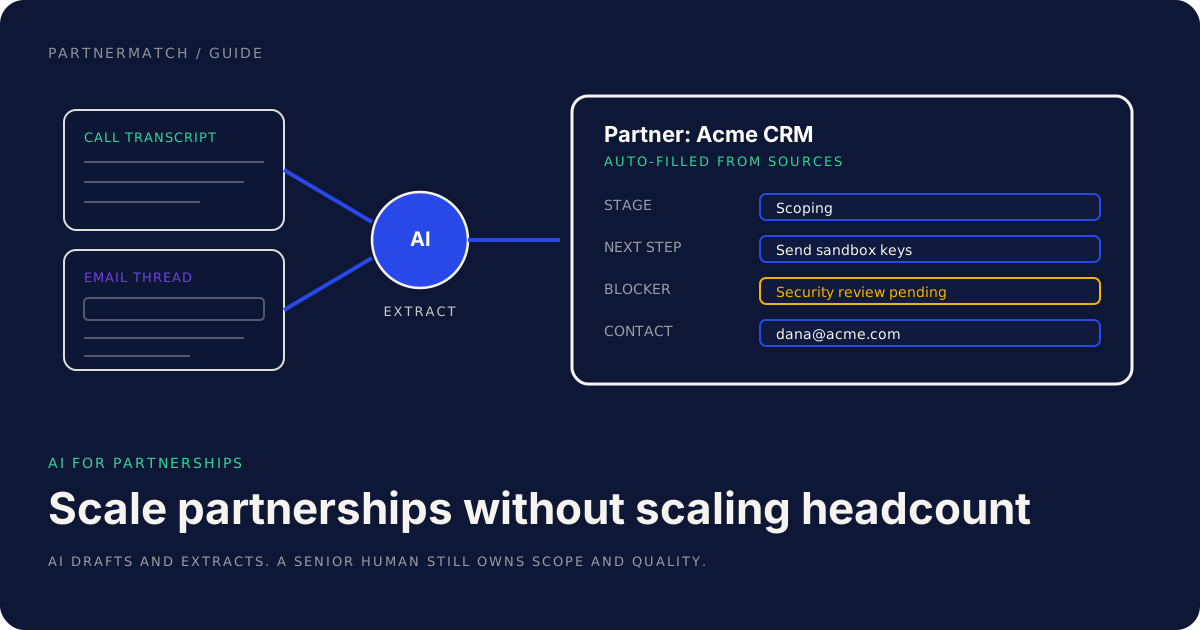
Partnerships is usually one or two people doing the work of five, which is exactly why AI for partnerships has become a real lever rather than a buzzword. A founder runs the relationships, someone in product owns the integration scope, and the collateral, the CRM updates, and the account mapping happen late at night or not at all. The channel works, but it does not scale, because the bottleneck is human attention on a pile of repetitive, unstructured work.
This is exactly the shape of problem AI is good at. Most of a partnerships team's week is reading transcripts, drafting one-pagers, matching account lists, and keeping a dashboard current. None of that is the part that needs a senior human. The judgment is: which partner, what scope, what the relationship needs next.
AI for partnerships, done well, takes the repetitive middle off your plate so the small team spends its hours on judgment. Done badly, it sends a hallucinated email to a partner's VP and sets you back a quarter.
This guide covers where AI partner tooling earns its place: four high-leverage use cases from real practice, when to build versus buy, the guardrails that keep it safe, and how it connects to shipping integrations. The through-line: AI accelerates the work, a senior human still owns scope, quality, and the partner relationship.
The 60-second version
If you only read one section, read this one:
- Partnerships is an unusually good fit for AI because the teams are small and the inputs are messy: call transcripts, email threads, account lists, and collateral that needs constant refreshing.
- AI-generated collateral with a human edit pass turns a day of deck-wrangling into an hour of editing, as long as a person owns the brand and the claims.
- A self-updating partner dashboard extracts stage, next step, blocker, and contact from transcripts and emails, so the CRM stops being manual data entry nobody does.
- Automated account mapping and co-sell attribution matches your pipeline against a partner's accounts and tags influenced deals, instead of two ops people reconciling spreadsheets.
- An AI coding assistant like Claude prototypes partner plugins and third-party integrations fast, so a senior engineer reviews and ships rather than starting from a blank file.
- Build versus buy is a real decision. Wire up your own tooling when the workflow is specific to you; use existing tools when it is generic.
- Guardrails are not optional: PII handling, a human in the loop, no unreviewed external sends, and attribution that is auditable.
- AI accelerates the work, but a human owns it. Scope, quality, and the partner relationship do not get delegated to a model.
Why AI for partnerships is an unusually good fit
Most functions adopting AI have to bend the tool to fit the work. Partnerships does not. The work already looks like the kind of thing AI handles well, for three reasons.
The teams are small. At seed to Series B, partnerships is rarely more than a couple of people, often part-time. Every hour formatting a one-pager or updating a CRM record is an hour not spent on the partner conversation that moves a deal. Small teams feel leverage faster, because there is no slack to absorb the busywork.
The inputs are unstructured. Partner work runs on call transcripts, email threads, account spreadsheets, and half-current collateral. This is precisely the messy, language-shaped input that AI reads well and a CRM form does not. The data exists; it is trapped in formats no one has time to process.
The collateral work repeats. One-pagers, pitch narratives, partner FAQs, training decks. Each new partner needs a variant of the last one, on-brand, with the specifics swapped. That is templated work with a judgment layer on top, which is the sweet spot: AI does the draft, a human does the judgment.
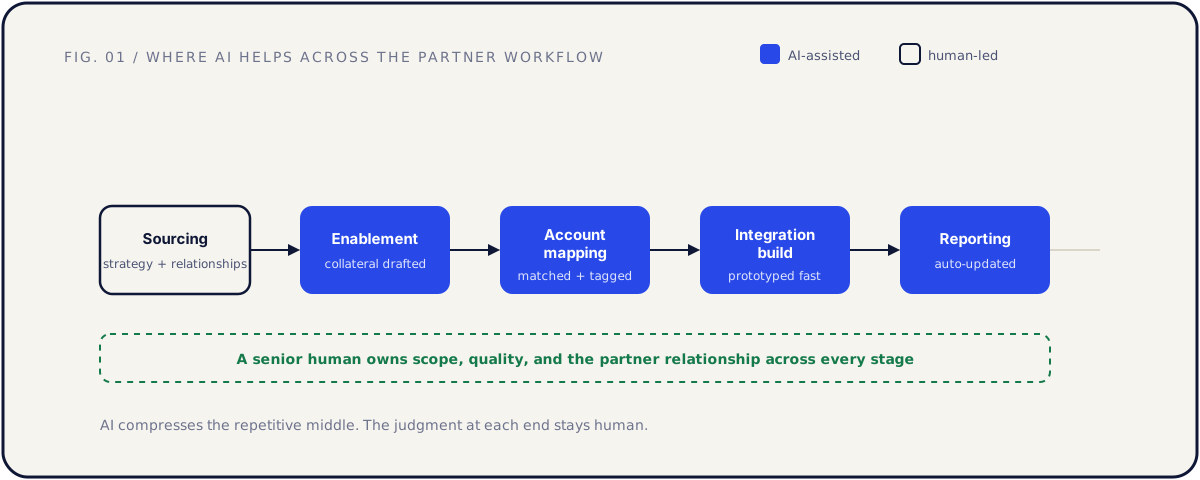
The map above frames the rest of this guide. Sourcing stays human-led, because it is relationship and strategy work. The middle of the workflow, where the repetitive volume lives, is where AI partner tooling pays off. A senior human owns the whole line, because the model is an accelerator, not an owner.
Use case 1: AI-generated partner collateral, kept on-brand
The most immediate win, and the easiest to get wrong, is collateral. Every partnership generates a stack of it: a one-pager, a pitch narrative for the partner's sales team, a partner-facing FAQ, an enablement deck, a training guide. Each is mostly the same structure with different specifics, and each eats a day someone does not have.
AI drafts this well. Give it your positioning, the partner's context, and the customer workflow the integration serves, and it produces a credible first draft in minutes. The same applies to summarizing a messy partner call into a clean narrative, or turning an existing deck into a partner-specific variant.
The non-negotiable is the human edit pass. A first draft is a starting point, not a deliverable. A person who knows the brand checks three things: the claims are true, the tone matches your voice, and nothing generic slipped through. AI defaults to safe, forgettable phrasing, and collateral that reads like everyone else's does not get used.
| Collateral type | What AI drafts | What the human owns |
|---|---|---|
| Partner one-pager | Structure, first-pass copy, the workflow story | Claims, positioning, final voice |
| Pitch narrative | The arc, talking points, objection handling | What is actually true in your deals |
| Partner FAQ | Common questions, draft answers | Accuracy, what not to promise |
| Training deck | Slide outline, speaker notes, examples | Brand, sequencing, the parts that matter |
A practical setup: keep a short brand and positioning brief you paste in with every request, so the model starts from your voice instead of a generic one. The better that brief, the less editing each draft needs.
The honest framing: AI turns a day of collateral work into an hour of editing. That is real leverage, and it is also the ceiling. It does not replace the person who knows which claim will survive a partner's legal review.
Use case 2: A partner dashboard that updates itself
Every partnerships team has the same dirty secret: the CRM is out of date. After a partner call, someone is supposed to log the stage, the next step, the blocker, and the new contact. In practice they are onto the next call, and the record drifts until the quarterly review, when nobody can remember what happened.
This is the use case where AI removes a chore people genuinely hate. A call transcript and the related email thread go in, AI extracts the structured fields, and the partner dashboard updates without anyone typing into a form.
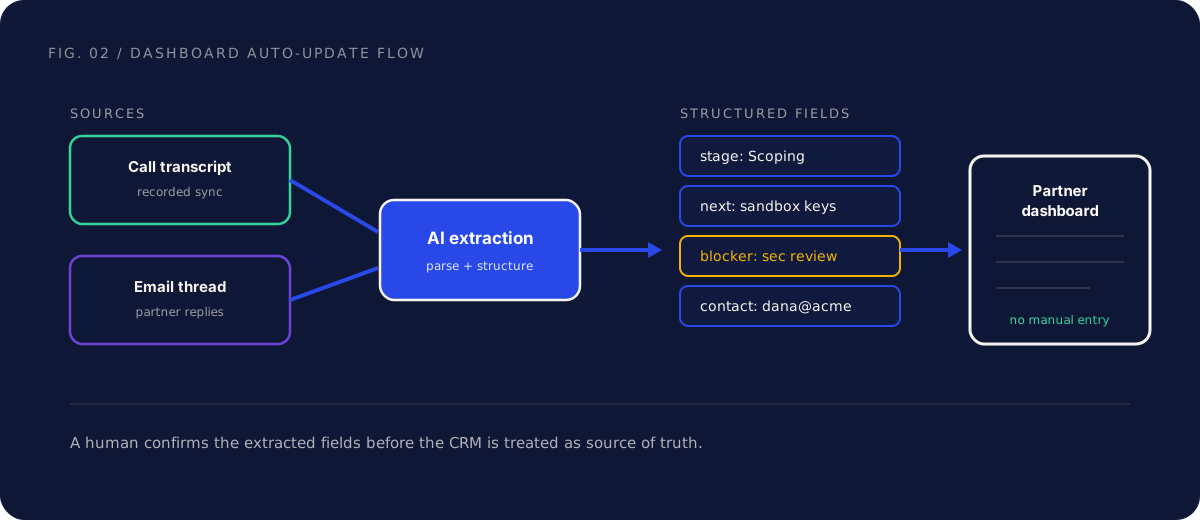
What the extraction pulls, per partner:
- Stage. Where the partnership sits: sourced, scoping, building, launched. Inferred from what was discussed, not from someone remembering to move a card.
- Next step. The concrete action and who owns it. "Send sandbox credentials by Friday" is a next step. "Keep in touch" is not.
- Blocker. What is stuck and which class it is, the same decision, dependency, access, and legal classes that drive every integration project.
- Contact. New people who appeared on the call or thread, with their role, so the relationship map stays current.
The discipline that keeps this safe is a confirmation step. The AI proposes the field updates; a human glances and confirms before the CRM is treated as source of truth. Extraction is good, not perfect, and a wrong stage that propagates into a forecast is worse than a blank field. The glance takes seconds; the data entry it replaces took the call note nobody wrote.
The payoff compounds. When the dashboard is current without manual effort, the weekly review runs on real data, blockers surface while they are still cheap to clear, and a founder sees the whole portfolio in one view instead of reconstructing it from memory.
Use case 3: Automated account mapping and co-sell attribution
Co-selling lives or dies on account mapping: which of your customers and prospects overlap with the partner's, and which deals the partnership actually influenced. Done by hand, this is two ops people trading spreadsheets and arguing about fuzzy company-name matches. It is slow, stale the day after it is done, and it makes attribution a guess.
AI is well suited to the matching problem. It reconciles account lists across naming inconsistencies, "Acme Inc" against "Acme Corporation" against "acme.com", flags the overlaps, and tags deals where the partner appeared in the sales process. A quarterly spreadsheet exercise becomes a continuously refreshed view.
| Account-mapping task | Manual reality | With AI partner tooling |
|---|---|---|
| Matching account lists | Spreadsheet VLOOKUPs, fuzzy-name guesswork | AI reconciles names and flags overlaps |
| Finding co-sell targets | Stale by the time it is built | Refreshed as pipelines change |
| Tagging influenced deals | Reps forget, attribution is a guess | Deals tagged from call and email evidence |
| Reporting to the partner | Days of manual prep before a QBR | A current view the partner can trust |
Two cautions keep this honest. First, attribution must be auditable. A deal tagged as partner-influenced should trace back to a specific signal: the partner named in a call, an intro email, a co-sell motion logged at the time. The moment your influenced-revenue figure looks inflated and cannot be defended, every report you send is suspect.
Second, the partner's account data is sensitive. Mapping your pipeline against theirs means handling their customer list, which lands you in the privacy guardrails below. Treat a partner's account list the way you would want them to treat yours.
The point is not to replace the partnership leader's judgment about which co-sell plays to run. It is to give them a current, trustworthy map to judge from, instead of a spreadsheet that was already wrong when they opened it.
Use case 4: Shipping integrations faster with an AI coding assistant
The partner roadmap is usually the real bottleneck. Strategy is cheap and fast; the build is where partnerships stall, because it needs dedicated engineering a small team rarely has spare. This is where an AI coding assistant like Claude changes the economics, not by replacing the engineer, but by collapsing the slow early part of the build.
Where AI such as Claude helps a partner engineering effort:
- Faster spikes. Standing up a throwaway prototype against a partner's API to test feasibility used to take days. With an AI assistant drafting the first version, it is hours. You learn early whether the partner's API can actually do what the scope assumes.
- Generated client SDKs and tests. Boilerplate clients, type definitions, and a first pass of tests are exactly the structured code an assistant produces well, freeing the engineer for the logic that needs care.
- Draft integration code a human reviews and ships. The assistant writes a first draft; a senior engineer reviews, hardens, and ships it. The blank-file cost, which is most of the friction in starting, disappears.
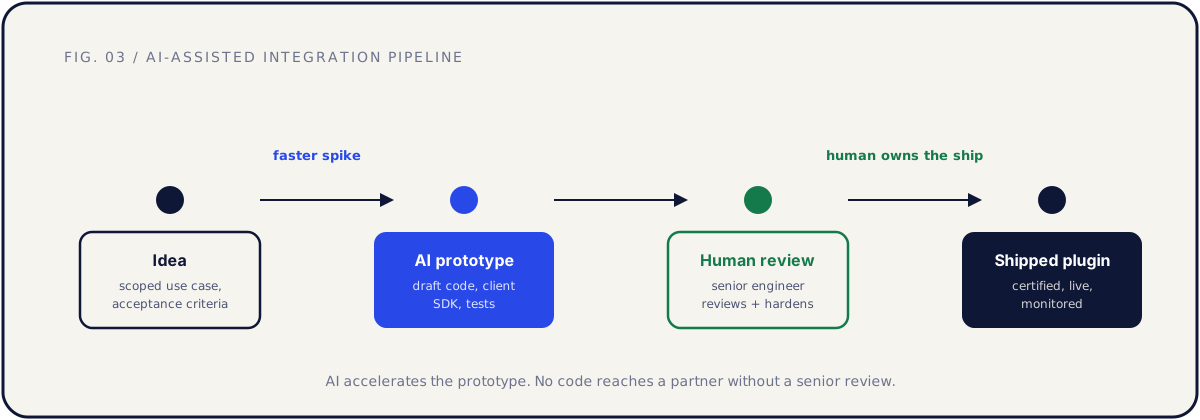
The pipeline matters as much as the speed. AI generates the prototype; a human reviews before anything reaches a partner. That review is not a formality. Integration code touches customer data and has to survive a partner's app review, and a draft that looks right but is subtly wrong about data ownership or error handling is more dangerous than no draft, because it looks finished. The senior engineer owns the ship.
The same acceleration applies to exposing your own product to AI agents. If you are building an MCP server so agents can use your product, an AI assistant helps draft the server and its tool definitions just as it helps with any integration, while the same review discipline decides what is safe to expose.
A caution on scope: faster prototyping makes it tempting to build more integrations than you can maintain. Speed at the build step does not change prioritization. Customer pull still decides what gets built, and every shipped integration is a maintenance commitment.
Build versus buy: wire it up or use an existing tool
Not every use case above deserves a custom build. The decision is the same one you make for any tooling: build when the workflow is specific to how you work, buy when it is generic.
| Decision | Lean build | Lean buy |
|---|---|---|
| Collateral generation | You have a strong, specific brand system | Generic drafting from off-the-shelf assistants is enough |
| Dashboard auto-update | Your CRM and stages are non-standard | A tool already integrates your CRM and call recorder |
| Account mapping | Your matching rules are unusual | A co-sell platform already does the matching |
| Integration prototyping | Always: this is your product's code | Never fully outsourced, but assistant-accelerated |
Three principles to apply the table:
Buy the generic, build the specific. Call transcription, basic CRM enrichment, and standard co-sell mapping are solved products. Reinventing them is a poor use of a small team's time. Build only where your workflow is genuinely different from the default.
Start with the assistant before the platform. Before wiring a custom dashboard pipeline, see how far a general AI assistant gets you with a transcript pasted in and a clear prompt. Often that proves the value and tells you whether a deeper build is worth it.
Account for maintenance, not just the build. A custom pipeline you wire up is one you maintain. Models change, APIs change, the glue breaks. Bought tools push that cost to the vendor.
The integration prototyping row is the exception that proves the rule. You never fully outsource your own product's integration code, but you also never write it without assistant acceleration anymore. That one is build, accelerated, always.
Guardrails for AI partner tooling: data, privacy, and trust
This is the section that keeps AI partner tooling from becoming a liability. The use cases above run on sensitive inputs: transcripts full of names, partner account lists, internal pipeline data. Speed without guardrails is how a team loses a partner's trust in a single bad send.
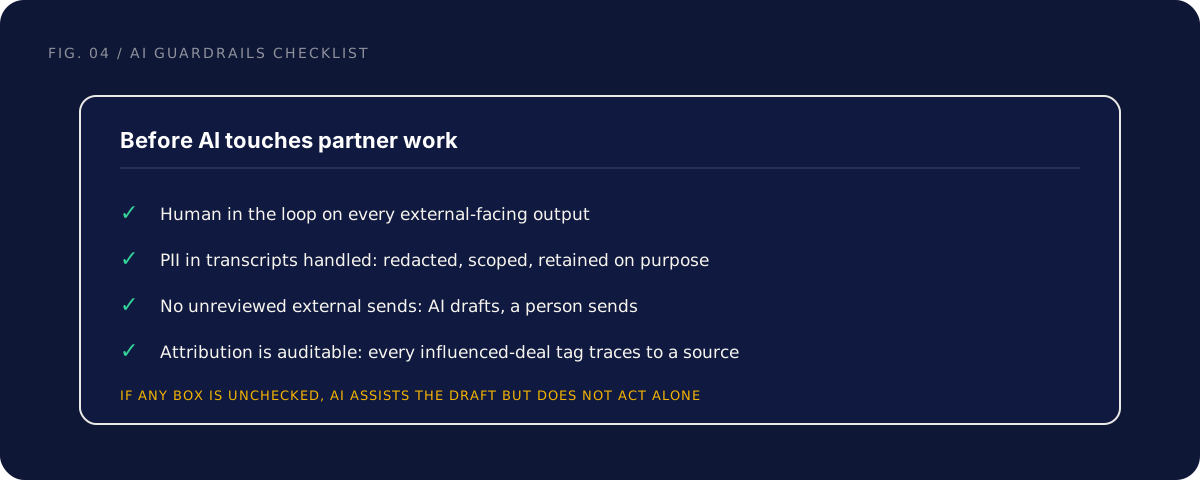
The four guardrails that are not optional:
Human in the loop. Every external-facing output, collateral, emails, anything a partner sees, passes a human before it ships. AI drafts; a person approves. This is the single rule that prevents the worst failure modes.
PII in transcripts. Transcripts contain names, contact details, and sometimes things said in confidence. Decide on purpose what you retain, redact what you do not need, scope who can access it, and check what your AI tooling does with the data. "We fed every customer call into a tool and never checked its data policy" is a sentence you do not want to say in a security review.
No unreviewed external sends. This deserves its own line because it is the most tempting corner to cut. An AI that can draft a partner email should never be wired to send it. The gap between draft and send is where a person catches the hallucinated commitment, the wrong contact, the tone that would land badly. AI drafts, a person sends.
Auditable attribution. Every influenced-deal tag must trace to a source signal. If your co-sell numbers cannot be defended line by line, they will eventually be challenged, and a model nobody can audit is worse than honest manual tagging. Build the trace in from the start.
The rule underneath all four: AI can read and draft freely, but acting on the outside world, sending, publishing, committing, stays human-gated. This is the same pattern that makes an agent-facing product safe, generous reads, guarded writes, and it is no coincidence it shows up here too.
How this connects to actually shipping integrations
Be clear about what AI does and does not change. It changes the cost of the work. It does not change the work.
The path from partner idea to live integration is the same as ever: strategy, targeting, API readiness, scope, build, enablement, launch, maintenance. That full arc is covered in our guide to tech partnerships for SaaS, and none of the steps disappear because AI got involved. The repetitive parts of each step get faster, so a small team runs the same playbook with less time and fewer people.
The connection runs both directions. AI helps you ship integrations faster, and it raises the bar for being a good integration target, because your customers increasingly reach your product through their own AI agents. A product an agent can reach gets used inside the workflow; one it cannot reach gets skipped. Becoming agent-ready is itself a partnership decision.
And the build, however fast the prototype, still becomes an integration project run across two companies, two roadmaps, and two legal teams. AI does not clear a blocker waiting on a partner's security review, and it does not make app review faster. The seams between companies are where timelines slip, and those seams are human. AI gives you back the hours, not the partner's calendar.
So the honest summary: AI lets a partnerships team of two operate with the output of a team of five on the repetitive work, while the judgment, the relationships, and the ownership stay where they were.
Common mistakes, and the fix
Letting AI send external messages unreviewed. The fix: AI drafts, a person sends, every time. The hours you save are not worth one hallucinated commitment in a partner's inbox. Wire the tooling so the send button is always human.
Shipping AI collateral without an edit pass. The fix: treat every draft as a starting point. A human who owns the brand checks claims, tone, and generic phrasing before anything reaches a partner. The draft is the cheap part; the judgment is the value.
Trusting extracted CRM fields without confirmation. The fix: a human confirms the proposed stage, next step, blocker, and contact before the dashboard is source of truth. A wrong field that propagates into a forecast costs more than the data entry it replaced.
Building custom tooling for generic problems. The fix: buy the generic, build the specific. Transcription and standard co-sell mapping are solved. Spend your build capacity only where your workflow is genuinely different, and account for the maintenance you are signing up for.
Treating faster prototyping as a license to build everything. The fix: customer pull still decides the roadmap. A prototype you can stand up in an afternoon is still an integration you maintain for years. Speed at the build step does not change prioritization.
FAQ
Will AI replace our partnerships hire? No. It replaces the repetitive work the hire spends too much time on: collateral formatting, CRM updates, account-list reconciliation. The relationship, the strategy, and the judgment about which partner to chase stay human. AI lets one person cover more ground, not zero people cover the same ground.
What is the single highest-leverage place to start? Usually the self-updating dashboard, because it removes a chore everyone hates and produces immediately useful data. Collateral generation is a close second and even easier to try, since you can test it with an off-the-shelf assistant and a good brand brief before building anything.
Is it safe to put call transcripts into an AI tool? Only after you have decided what the tool does with the data. Check its retention and training policy, redact PII you do not need, and scope access. Transcripts contain names, contact details, and confidential remarks. The convenience does not override your obligation to handle the data responsibly.
Can AI write our integration code end to end? It can write a strong first draft and accelerate the prototype dramatically. It cannot own the ship. Integration code touches customer data and has to pass a partner's certification, so a senior engineer reviews and hardens every draft. The model removes the blank-file cost; the human removes the risk.
Which AI coding assistant should we use for partner integrations? An assistant like Claude is well suited to writing and refactoring integration code, drafting client SDKs and tests, and summarizing partner API docs. The more important decision is the workflow around it: prototype with AI, review with a senior engineer, ship only after review. The tool matters less than the discipline.
How do we keep co-sell attribution credible? Make every influenced-deal tag traceable to a source: a partner named in a call, an intro email, a logged co-sell motion. If a number cannot be defended line by line, do not report it. Auditable attribution is what keeps a partner trusting your numbers when the figure is large.
Do we need to build custom tooling, or can we use existing products? Both. Buy the generic parts, transcription, standard CRM enrichment, co-sell platforms, and build only where your workflow is genuinely specific. Start by seeing how far a general assistant gets you before committing engineering time to a custom pipeline you will have to maintain.
How does AI partner tooling connect to becoming AI-agent ready? They are two sides of the same shift. AI helps your team do partnership work faster, and your customers' AI agents increasingly reach your product directly, which makes exposing your product to agents its own partnership decision. The review discipline that keeps your internal AI tooling safe is the same discipline that makes an agent-facing product safe.
The short version
Partnerships is an unusually good fit for AI because the teams are small and the inputs, transcripts, emails, account lists, and endless collateral, are exactly the messy, language-shaped work AI handles well. A team of two can produce the repetitive output of a team of five.
Use AI to draft collateral with a human edit pass, to keep the partner dashboard current from transcripts and emails, to map accounts and tag co-sell deals, and to prototype and ship integrations faster with an assistant like Claude. Buy the generic, build the specific. Keep a human in the loop, handle PII on purpose, never let AI send external messages unreviewed, and make attribution auditable.
The line that does not move: AI accelerates the work, but a senior human still owns scope, quality, and the partner relationship. The model gives you back the hours. What you do with them is still the job.
If you want help deciding where AI fits your partnership work, and which integrations to ship first, that is exactly what a Partner Audit is for. We review your product, API, and partner potential, then define what to build, who to approach, and how to ship it.